
您正在为即将到来的一周做准备,于是打开了您的Google日历。您发现其中有一条会议记录,您完全忘记了它的存在。当您点击它时弹出的提示显示,您将审查一个项目,并附有更多详情的链接。您感到困惑,于是点击链接以获取更多信息;您进入的网站要求输入登录信息,您便提供了。
ou're preparing for the week ahead and take a look at your Google calendar. There's an entry for a meeting that you must have completely forgotten. The note that pops up when you click on it says you'll be reviewing a project and includes a link to more details. Confused, you follow it to find out more; the website you land on asks for logon details, and you provide them.
不幸的是,这并不是您记忆力的失误,而是一次日历钓鱼诈骗。您已将姓名和密码交给了欺诈者,他们会将这些信息与其他人的数据打包出售,用它入侵您的工作邮箱,或者冒充银行或其他机构联系您,试图欺骗您。
Unfortunately, this was not a failure of your memory but a calendar phishing scam. You have handed your name and password to fraudsters who will sell it on in a batch with other people's details, use it to break into your work email, or to persuade you that they are contacting you from your bank or another institution.
Sublime Security的威胁检测工程师Luke Wescott表示,日历钓鱼仍是一种相对较新的手段,但该公司已观察到其呈“指数级增长”。
Luke Wescott, a threat detection engineer at Sublime Security, says calendar phishing is still relatively new but the company has seen "exponential growth".
这种诈骗有多种形式,包括虚假会议或提示您续订您正在付费的服务。无论如何,都会在您的电子日历中出现一条条目。
The scam takes several forms, including a fake meeting, or a prompt to renew a service you pay for. In all, an entry appears in your electronic calendar.
这些条目之所以出现在日历中,是因为诈骗者向您的工作邮箱或个人邮箱发送了一封带有日历请求的邮件。无论您是否看到它,或者它是否被归入垃圾邮件文件夹,都无关紧要。
It ends up there after scammers send an email to your work, or personal address, with a calendar request. It doesn't matter if you miss it, or it ends up in your spam folder.
Wescott说:“像Google Calendar这样的日历应用程序可以在用户甚至未接受邀请的情况下自动添加日程。”因此,诈骗者甚至不需要您打开那封邮件。而当您看到一条来自不认识的人的日历条目时,您可能不会太在意;但当某事出现在您的日历中时,您可能会对其持不同态度。“它可以通过出现在与您牙医预约或与老板的一对一周会相同的位置,获得一种借来的可信度,”他说。
"Calendar apps, such as Google Calendar, can add invitations automatically without users even accepting them," Wescott says. "So scammers don't even need you to open an email." And while you may not look twice at one from someone whose name you do not recognise, when something turns up in your calendar you may treat it differently. "It can create a borrowed credibility by showing up in the same place as your dentist appointment or a weekly 1:1 with your boss," he says.
网络安全公司Cofense的情报分析经理Max Gannon表示,一些诈骗者正在使用Zoom等合法平台发送邀请,使其看起来更具说服力,以欺骗收件人和安全软件。
Max Gannon, an intelligence analysis manager at the cybersecurity company Cofense, says some scammers are using legitimate platforms such as Zoom to send the invitations, making them look more convincing to the recipients, and to security software.
这真的很难阻止,他说。"即使是人工智能支持的拦截器也很难应对。"如果你设置了过滤来自这些平台的邀请,他说,"那也会阻止任何合法的会议邀请。"
"That makes it really hard to block," he says. "Even AI-backed blockers struggle." If you set up something to filter out invitations from these platforms, he says "that would also block any legitimate meeting invitations".
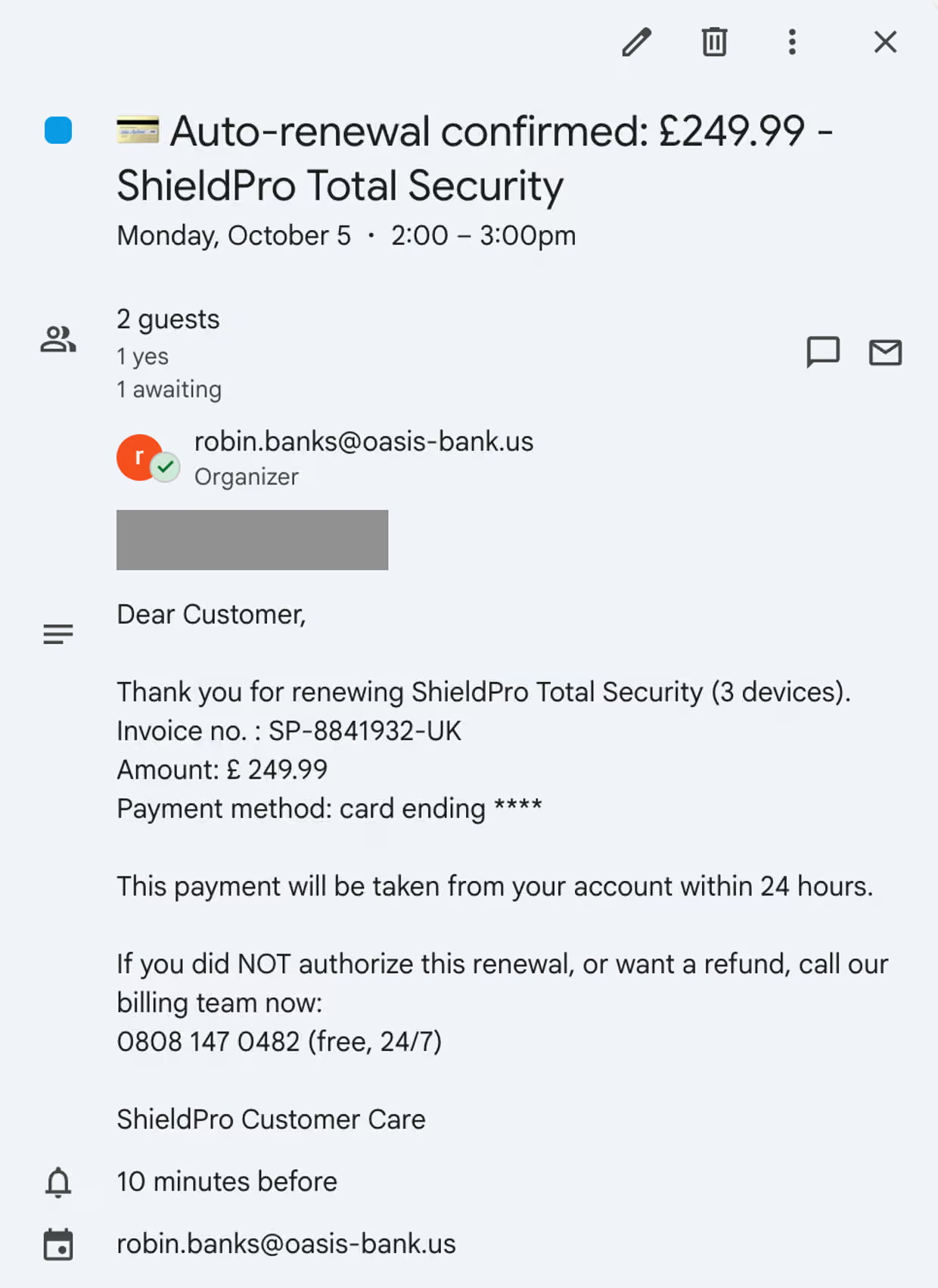
你看到的情况是:你会收到一封电子邮件,并在日历中看到一条记录。标题各不相同:卫报看到的例子包括虚假会议、语音留言通知和软件续订。
What it looks like You will receive an email and see an entry in your calendar. The titles vary: examples seen by the Guardian include fake meetings, notifications of voicemail messages, and software renewals.
韦斯科特说这是很常见的。"我们通常会看到诸如'收到新语音留言'、'付款收据确认 – 298.99美元'、'PayPal异常活动'警告、'您的自动付款将在24小时内处理'以及参与合同投标的邀请,"他说。
Wescott says this is standard. "We typically see stuff like 'New voicemail received', 'Payment receipt confirmation – $298.99', 'PayPal unusual activity' warnings, 'Your auto-payment will be processed within 24 hours', and invitations to bid on a contract," he says.
冈农说,这个邀请可能看起来像是来自你公司内部的。"如果他们愿意,他们可以让它看起来像是内部邀请,"他说。"他们可以自定义内容,甚至可能添加贵公司的标志。"事件描述通常会包含一个链接或一个电话号码。
Gannon says the invitation could look like it has come from within your company. "If they want to they could make it look like an internal invitation," he says. "They can customise the content, may be adding the logo of your company." The event description will typically contain a link, or a phone number.
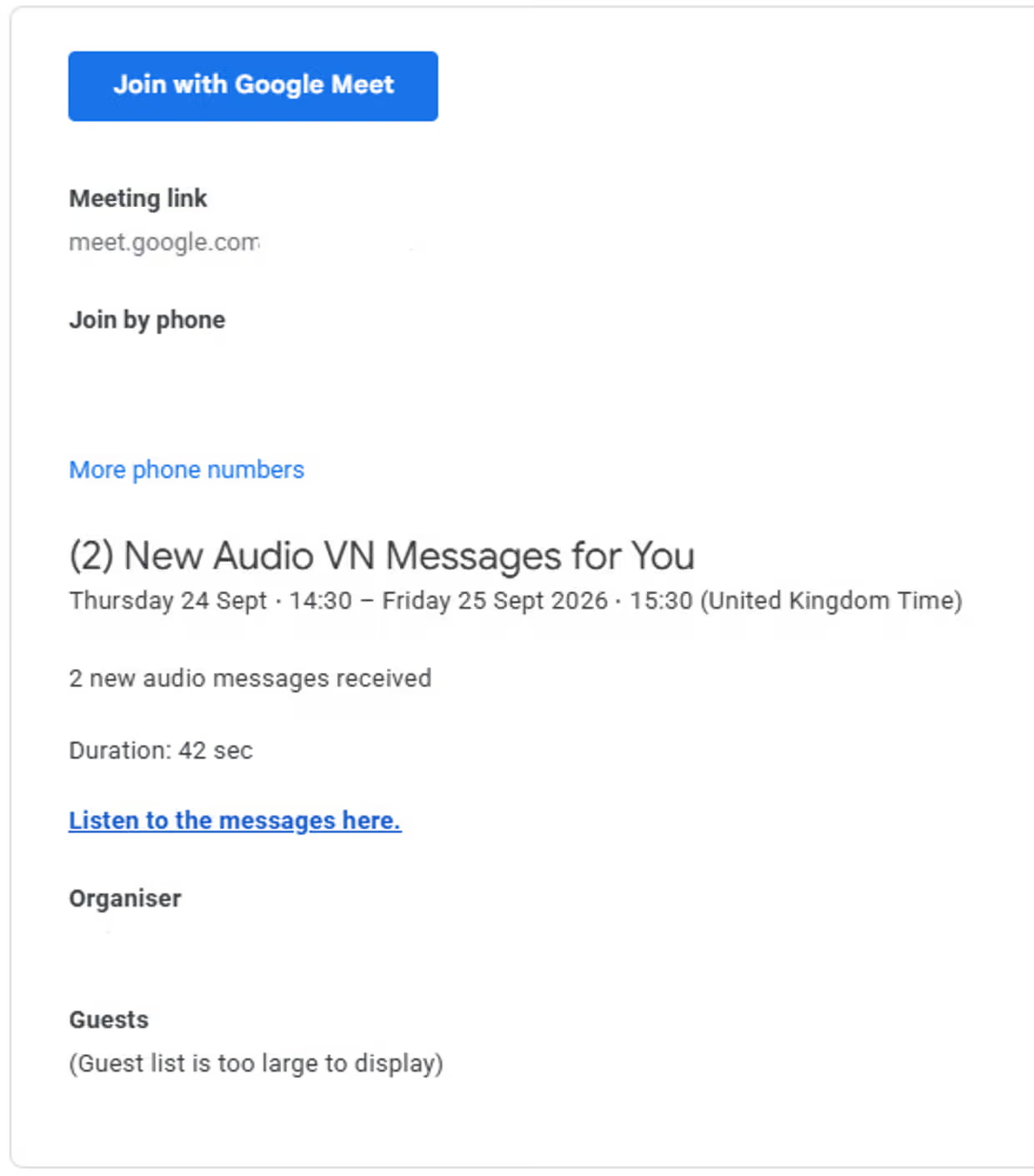
韦斯科特补充道:"要么他们希望你点击一个链接进入一个假冒的页面,比如微软、谷歌或PayPal,然后输入你的密码;要么他们希望你打一个所谓的'支持'电话来取消一个实际上从未发生的费用。"在你点击链接或拨打电话之前,你不会受到威胁。骗子无法访问你日历中的所有内容——他们只是试图引诱你进入一个你会泄露个人信息的地方。
Wescott adds: "Either they want you to click a link to a fake page like Microsoft, Google or PayPal, and enter your password, or to call a 'support' number to cancel a charge that never actually happened." Until you click on this, or make a call, you are not compromised. The scammers do not have access to everything in your calendar – they are just trying to lure you to a place where you will hand over your details.
正如韦斯科特所说:"这听起来就像典型的网络钓鱼,手法完全相同,只是使用了不同的传递方式。"
As Wescott says, "it sounds familiar to typical phishing, it's the same technique, just using a different delivery method".
该怎么做:如果你在日历中看到意外的会议或提醒,不要惊慌。把它当作意外收到的邮件来对待,不要点击其中的链接。
What to do Don't panic if you see an unexpected meeting or reminder in your calendar. Treat it as you would an unexpected email and don't click on the link.
我的首要建议是人们只需要保持警惕," Gannon 说。"无论邀请是来自隔壁两个办公桌的人,你都必须对一切保持怀疑。" Wescott 建议关闭自动接受功能。在 Google 日历中,你可以进入设置,选择仅接受已知发件人的邀请,或在你已接受后才允许接受。
"My number one advice is people just need to be paranoid," Gannon says. "It doesn't matter if the invitation has come from someone two desks down, you've got to be suspicious of everything." Wescott advises turning off automatic accepting. In Google Calendar you can go into settings and opt to only accept invitations from known senders, or when you have accepted.
他补充道:"不要点击可疑邀请的'拒绝',因为这可能会告诉发件人你的地址是'活跃的'。相反,应直接删除或将其标记为垃圾邮件/广告邮件。"
He adds: "Don't click 'decline' on suspicious invites as it can tell the sender that your address is 'live'. Instead, delete or report it as spam/junk."