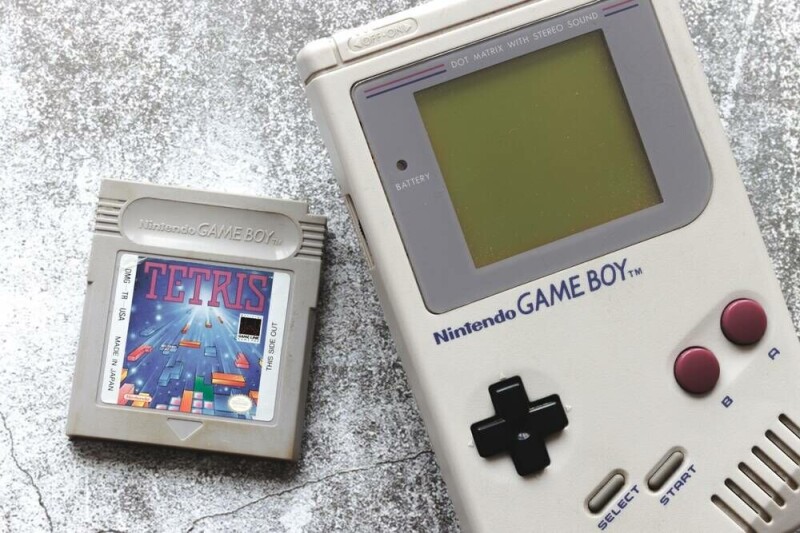
当然,在电子墨水屏上以每秒30帧、四种灰度运行模拟的Game Boy游戏很酷,但你知道什么更酷吗?一种自定义的开源电子墨水驱动程序,理论上可以让任何显示屏实现同样的效果。YouTuber Bo Made It上周发布了一段视频,演示了他在一块由ESP32-S3供电的微型电子墨水板上所称的“InkBoy”。它看起来就像最初Game Boy上那种老式橄榄绿屏幕一样好——虽然这其实没什么可吹嘘的,但能在廉价的现成电子墨水屏上实现这一点确实令人印象深刻。
Sure, running emulated Game Boy games at 30 fps with four shades of gray on an E Ink screen is cool, but you know what's cooler? A custom open source E Ink driver that could theoretically let any display do the same thing. YouTuber Bo Made It published a video last week demonstrating what he calls the InkBoy on a tiny ESP32-S3-powered e-paper board. It looks just about as good as the old-fashioned olive-green screen on the original Game Boy, which isn’t saying much, but it’s an impressive feat to make this work on a cheap stock e-paper screen.
对于从未拥有过电子阅读器的人来说,电子墨水显示屏在其设计用途方面表现出色。它们可以通过利用电脉冲在单个像素内移动带电色素颗粒来保持屏幕内容,而无需持续消耗能源,从而使屏幕状态能够以物理方式存储。这使得电子墨水设备非常节能,但代价巨大:与我们习惯的现代显示屏相比,改变这些像素的速度异常缓慢,就像冰川运动一样。
For those who haven’t owned an e-reader, E Ink displays are great at what they’re designed for. They can retain what's on the screen without continuously consuming energy by using electrical pulses to move charged pigment particles within individual pixels, enabling them to store the screen state physically. That makes e-paper devices very power efficient, but it comes with a huge trade off: Changing those pixels is a glacially slow process compared with the modern displays we're all accustomed to.
例如,Bo用来制作InkBoy的那块屏幕,其刷新速度约为300毫秒,这实际上已经是电子墨水显示屏中较快的一端了——但真正实用的也仅限于显示静态图像。标准的黑白电子墨水显示屏包含两种类型的色素:带正电的黑色色素和带负电的白色色素。在这两者之间切换需要按照特定波形模式施加一系列短暂的电脉冲,逐步将像素从屏幕前部移动到后部,从而清除掉不应出现在表面的大部分色素。
The screen that Bo used to make his InkBoy, for example, has a refresh speed of around 300 milliseconds, which is actually on the faster end of e-paper displays - but only really practical for displaying static images. Standard black and white E Ink displays contain two types of pigments: Positively charged black ones, and negatively charged white pigments. Swapping between the two requires a series of brief electrical charges in a particular waveform pattern that gradually move the pixels from the front of the screen to the back, clearing out most of the pigment that shouldn’t be at the surface.
Bo的Waveshare 1.54英寸ESP32-S3电子墨水显示屏的原生驱动程序正是如此工作的,而且它几乎没有留下用于显示运动的空间。为了克服这些限制,Bo为该显示屏构建了自己的驱动程序,通过缩短波形并启用逐像素驱动来减少图像鬼影。
The native driver in Bo’s Waveshare 1.54-inch ESP32-S3 e-paper display does just that, and it doesn’t leave a lot of room for displaying motion. In order to get around those limitations, Bo built his own driver for the display that shortened the waveform and enabled per-pixel driving to reduce image ghosting.
更令人印象深刻的是,它使他看似黑白的屏幕能够显示四种灰度,就像最初的Game Boy一样。他最初使用抖动来创建灰度图像,但效果确实很糟糕。幸运的是,Bo在尝试解决图像残影问题时发现了一些东西。“我注意到显示屏已经在产生灰色 — — 只是偶然的,”他在视频中说道。“颜料不会瞬间从黑色跳到白色,所以我想知道,如果我故意在过渡过程中停止驱动它,我能否按需产生这些灰度?”
More impressively, it enabled his ostensibly black and white screen to display four shades of grey, just like an original Game Boy. He was originally using dithering to create greyscale images, but it honestly looked horrible. Luckily Bo noticed something while trying to fix the issue of image ghosting. “I noticed the display was already producing grey - just accidentally,” he said in his video. “The pigment doesn’t instantly jump from black to white, so I wondered if I deliberately stop driving it partway through the transition, can I produce those grey levels on demand?”
答案是肯定的,并且经过一些额外的调整,他能够以每秒30帧的速度产生这些灰度 — — 相比原始驱动仅能达到的每秒3.33帧,这是一个巨大的进步。这是一项令人印象深刻的成就,但这是首次吗?不完全是,但它仍然是一种加快E Ink刷新时间的新方法。正如Bo所解释的,他的灵感来自另一位YouTuber,该YouTuber自己制作了一个E Ink Game Boy,尽管使用了完全定制的硬件,使他们能够绕过典型的E Ink屏幕设计来创建自己的更快显示器。
The answer was yes, and with some additional tweaking he was able to produce those grey levels at 30 frames per second - a vast improvement from the 3.33 frames per second available with the original driver. It’s an impressive accomplishment, but is it a first? Not quite, but it’s still a new way of approaching faster E Ink refresh times. As Bo explains, he got his idea from another YouTuber who built their own E Ink Game Boy, albeit with some entirely custom hardware that allowed them to bypass typical E Ink screen design to create their own faster display.
Bo所做的是为标准硬件编写了自己的驱动程序,这本身就是一项令人印象深刻的成就,而且一位有冲劲的用户理论上也可以在需要时自行复制。经过一个月的工作,并承认在驱动程序中使用了一些“氛围编码”,Bo在GitHub上发布了他驱动程序的可工作版本,但附带了一个严重的警告:不仅在E Ink屏幕上强制使用自定义波形和更高刷新率可能导致永久性损坏,而且长期面板寿命也没有作为他实验的一部分进行评估。
What Bo did was code his own driver for stock hardware, making this an impressive accomplishment in its own right, and one enterprising user could theoretically reproduce on their own if desired. After a month of work, and with the admitted use of some vibe coding for the driver, Bo has published a working version of his driver on GitHub, but with a hefty warning: Not only can forcing custom waveforms and higher refresh rates on E Ink screens cause permanent damage, but long-term panel life wasn’t evaluated as part of his experiment, either.
换句话说,如果你打算尝试这一点,请自行承担风险,并且也许不要在你改装的Kindle上操作 — — 相反,买一个便宜的E Ink屏幕来进行实验。®
If you’re going to try this, in other words, do so at your own risk, and maybe not on your modded Kindle - buy a cheap E Ink screen to break instead. ®