
苹果公司推出的新款“音频智能”Apple Watch 功能,让该公司迈出了涉足一个炙手可热的新细分领域的小小一步:能够总结日常对话、帮助用户保持专注的 AI 穿戴设备。但在将苹果的工具与 Amazon Bee、Granola 和 Otter 并行测试了一周后,我发现竞品提供的笔记更实用,而苹果的结果很难为其带来的隐私妥协辩护。
With its new Audio Intelligence smartwatch features, Apple Inc. is taking a small step into a hot new segment: AI wearables that can summarize everyday conversations to help you stay present. But after a week of testing Apple’s tools alongside Amazon Bee, Granola and Otter, I found that rivals delivered more useful notes and that Apple’s results rarely justified the privacy trade-offs.
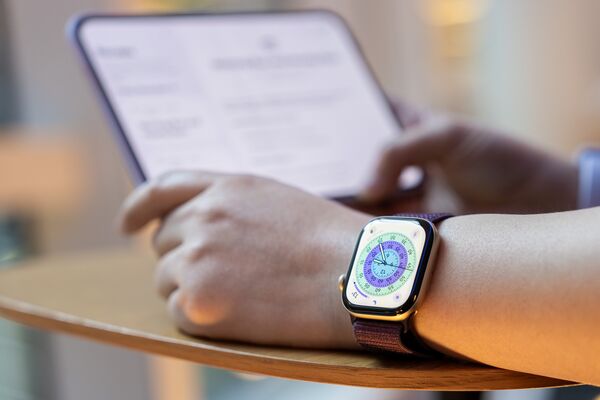
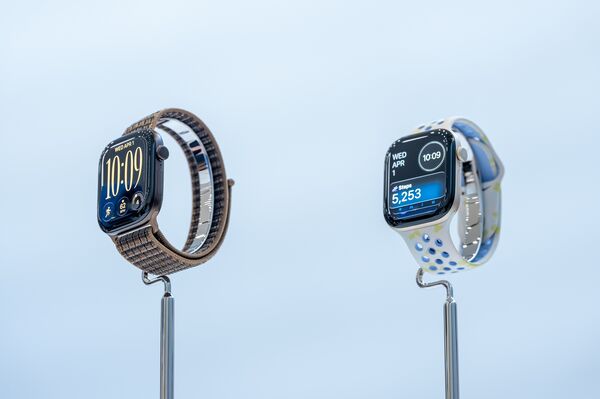
该公司于 9 月发布 Apple Watch Series 12 和 Ultra 4 时,首次推出了这些备受争议的 AI 音频功能。这些需要用户主动选择加入的新工具,利用手表的麦克风追踪声音和附近的对话,并借助 AI 进行分析。“Siri 概要”会对用户全天的对话记录高层级笔记,并将其存储在新的“Siri AI”App 中。“实时回溯”则允许佩戴者双击表冠,调出前 15 秒对话内容的文字记录。
The company first unveiled the controversial AI audio features in September alongside the Apple Watch Series 12 and Ultra 4. The new tools, which require the user to opt in, use the watch’s microphone to track sounds and nearby conversations and AI to analyze them. Siri Recap takes high-level notes on the user’s conversations throughout the day, storing them in the new Siri AI app. Live Rewind, meanwhile, lets the wearer double-press the watch’s crown to bring up a text transcript of what was said during the previous 15 seconds of a conversation.
“音频智能”目前已在开发者测试版中提供,计划于 12 月面向消费者推出。在此之前功能可能会有所改进,但就目前而言,AI 摘要可能不准确或不完整,让我对全天听到的内容产生的疑问比答案还多。更别提对周围人隐私的影响了。至于“实时回溯”,苹果举的例子是:在餐厅与服务员交谈时重放部分对话,免得再请对方重说一遍。但在我的测试中,我极少用到这个功能。而且每当我请求回溯时,记录都存在不准确之处,即使在没有背景噪音的环境下也是如此。
Audio Intelligence is available now in a developer beta and is scheduled to reach consumers in December. It could see some improvements before then, but as of now, the AI summaries can be inaccurate or incomplete, and they’ve left me with more questions than answers about what I had heard throughout the day. And that’s not to mention the privacy implications for those around me. As for Live Rewind, Apple has used the example of replaying part of an exchange with a waitress at a restaurant so you don’t have to ask her to repeat herself. But I rarely found myself reaching for that feature throughout my testing. And whenever I requested a rewind, it contained inaccuracies, even in environments without background noise.
尽管仍处于起步阶段,AI 音频领域已吸引投资者的超额资金涌入,销售额也在增长。初创公司 Granola Inc. 的 AI 记笔记软件在科技从业者中颇受欢迎,该公司 3 月以 15 亿美元估值融资 1.25 亿美元。生产录音设备和会议摘要软件的 Plaud Inc. 表示,其年度经常性收入于 5 月突破 1 亿美元,预计今年硬件和订阅销售额将达 5 亿美元。自 2016 年起深耕转录工具的老牌企业 Otter.ai Inc. 近期融资 3.2 亿美元。
While still nascent, the AI audio segment has attracted outsized funding from investors, and sales are growing. Granola Inc., a startup whose AI notetaking software is popular among tech workers, raised $125 million at a $1.5 billion valuation in March. Plaud Inc., which makes recording devices and meeting summary software, said it passed $100 million in annual recurring revenue in May and expects to book half a billion dollars in hardware and subscription sales this year. Otter.ai Inc., an incumbent in transcription tools since 2016, recently raised $320 million.
Siri Recap 与 Granola、Plaud 以及其他设备上的类似功能(如亚马逊收购的 AI 可穿戴品牌 Amazon Bee)相似。但那些产品只有在用户按下按钮时才开始监听,而苹果可以在后台自动进行(前提是你允许)。其中大多数能提供更详细的摘要,如果用户将 Gmail 或 Photos 等其他服务连接到记笔记工具,还能提供更多上下文。苹果不保留完整的音频转文本输出,而亚马逊、Granola 和 Otter 则会保留。
Siri Recap is similar to Granola and Plaud, along with features on other devices such as Amazon Bee, the AI wearable brand Amazon.com Inc. acquired last year. But those products only start listening when the user presses a button, whereas Apple can do it automatically in the background (if you allow it to). Most of them are able to provide more detailed summaries, as well as more context if users have other services like Gmail or Photos connected to the notetakers. Apple doesn’t retain the full audio-to-text output, whereas Amazon, Granola and Otter do.
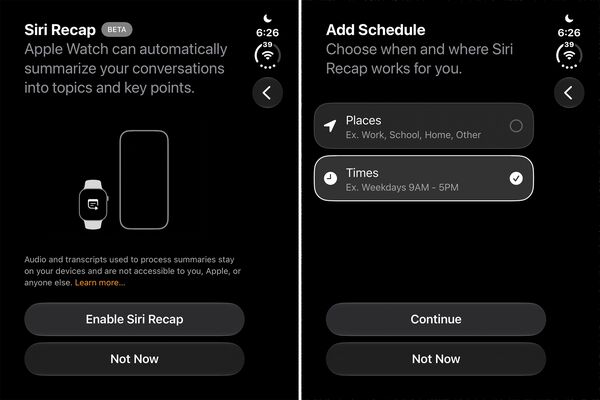
在让这些工具融入我的生活一周后,我的主要结论是:苹果的实验性音频功能最好仅用于低风险场景。因为苹果将 Siri Recap 设计为易于设置且可“设置后即不管”,我发现看到随机对话被摘要(甚至包括我未参与的对话)令人不安。考虑到我从中获得的收益极少,这种隐私权衡根本不值得。与此同时,竞品能提供更准确、更全面的笔记,适用于个人和商务场景。
My main takeaway after letting the tools into my life for a week: Apple’s experimental audio features are best left for low-stakes situations. Because the iPhone maker designed Siri Recap to be easy to set up and forget, I found it unsettling to see random conversations summarized, even ones I wasn’t part of. Given how little I got out of them, the privacy trade-offs just weren’t worth it. Meanwhile, competing products were able to deliver more accurate and comprehensive notes, making them suitable for both personal and business uses.
为撰写此评测,我让 Apple Watch 全天候监听我的所有对话。(你可以设定特定时间表或地点来决定何时让 Siri 监听,也可在手表上手动开关。)实际体验如下:与 Siri Recap 相比,亚马逊 Bee、Granola 和 Otter 等竞品更清晰地展示了这些 AI 工具如何融入人们的生活。
For the purposes of this review, I let the Apple Watch listen to all my conversations at all hours. (You can set specific schedules or locations for when you want Siri to be listening, or turn it on and off manually on the watch.) Here’s how that played out: Compared with Siri Recap, competing products from Amazon Bee, Granola and Otter offer a clearer vision for how these AI tools can fit into someone’s life.
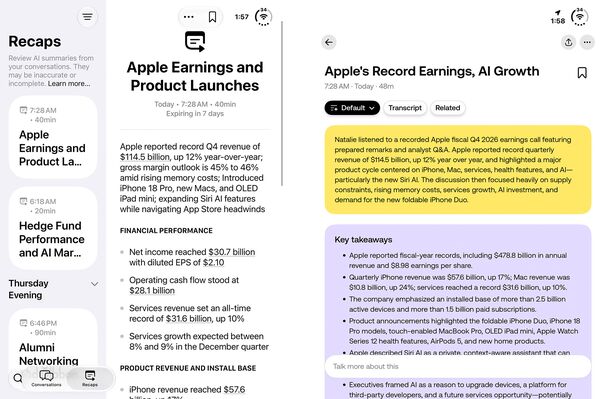
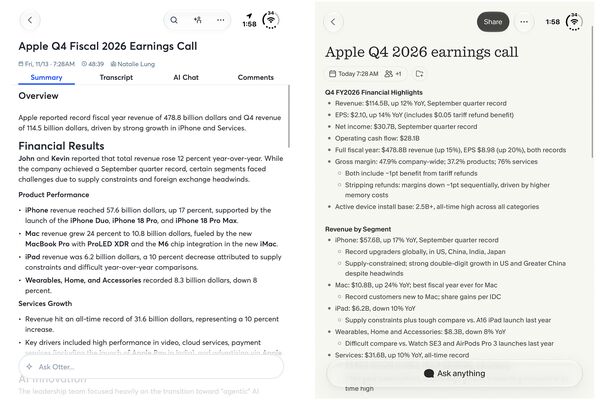
Granola 和 Otter 都作为务实的会议转录和记笔记工具运作,因此既适合个人使用,也适合专业场景。它们的转录工具可在移动端和桌面端运行,并支持 Windows、Android 以及苹果的操作系统。
Granola and Otter both function as no-nonsense meeting transcription and notetaking tools, making them suitable for both personal and professional uses. Their transcription tools work across mobile and desktop devices, and on platforms that include Windows, Android and Apple’s operating systems.
与此同时,亚马逊 Bee 将其最新录音设备 Bee Frontier(售价 75 美元)定位为帮助用户“反思、记忆和成长”的工具——这可能具有侵入性,也可能提供助益,取决于你想从中获得什么。它提供整场对话的转录文本,并给出深度要点、整体语气备注以及供我反思的建议。
Meanwhile, Amazon Bee has positioned its newest recording device, the $75 Bee Frontier, as a tool that helps users “reflect, remember and grow” — which can be invasive or assistive depending on what you want to get out of it. It provides a transcription of the entire conversation, with in-depth takeaways, notes on the overall tone and suggestions for me to reflect on.
你还可以进一步将 Bee 应用连接到你的位置信息和照片,这有助于让对话摘要更准确。例如,它能根据我的行踪和我拍摄的海报照片,更好地描述我正在参加的活动,即使对话中并未提及这些内容。虽然这些功能可作为快速日记条目很有用,但这种即时洞察也让人们避开了真正自我反思的艰苦工作。
You can also go further and connect the Bee app to your location and photos, which helps make the conversation summaries more accurate. For example, it was able to better describe an event I was attending based on my whereabouts and pictures I took of the posters, even though they weren’t mentioned in the conversations. While these can be useful as quick diary entries, such instant insights help people avoid the harder work of actual self-reflection.
在让 Apple Watch 和亚马逊 Bee 整周在后台监听我的对话时,我还无意中让它们在未发出任何警告的情况下总结了周围的音频,这凸显了法律专家为何感到担忧,尤其是在对话所有参与方都需要同意录音的州份。苹果表示,Siri Recap 和 Live Rewind 不会保留音频,也不会将引语归因于特定发言人,但专家们警告称,这是窃听法中未经检验的领域。他们建议,用户最好主动告知正在使用该功能,以免惹上麻烦。
In letting the Apple Watch and Amazon Bee listen to my conversations in the background throughout the week, I also inadvertently let them summarize surrounding audio without giving any sort of warning, underscoring why legal experts are concerned, especially in states where all parties in a conversation need to consent to a recording. Apple says Siri Recap and Live Rewind don’t retain audio or attribute quotes to specific speakers, but the experts have cautioned this is an untested area in eavesdropping laws. Users are better off announcing that they’re using the feature to stay out of trouble, they said.
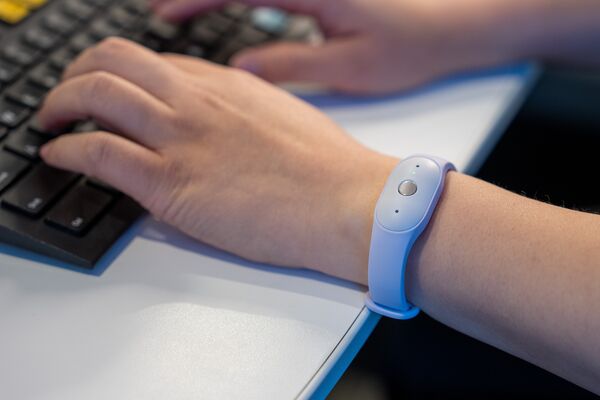
当有人请求对话的 15 秒回顾时,Live Rewind 会播放可听见的提示音并显示麦克风图标,但 Siri Recap 没有类似的警示。Amazon Bee 在用户开始录音时也不会播放提示音;它只有设备上一个小的绿灯指示正在录音。但它确实内置了一个设置,让用户可以选择在检测到无音频一定时间后何时停止录音。
While Live Rewind plays an audible chime and shows a microphone icon if someone requests a 15-second recap of a conversation, there’s no equivalent warning for Siri Recap. The Amazon Bee doesn’t play an alert when the user starts recording either; it only has a small green light on the device to indicate that recording is on. But it does have a built-in setting that lets users choose when recording stops if no audio is detected after a certain amount of time.
与此同时,Granola 的 Apple Watch 应用会在用户开始录音时播放声音。在长时间录音的不同节点,它还会向佩戴者发送振动,提醒他们麦克风仍处于开启状态。在使用 Siri Recap 后,我对这些提示很是感激,因为确实有几次它不该捕捉我周围的对话。
Meanwhile, Granola’s Apple Watch app plays a sound whenever the user starts a recording. It also sends the watch wearer a vibration at different points of a long recording to remind them that they still have their mic on. I appreciated those nudges after using Siri Recap, when there were definitely times it shouldn’t have been capturing conversations around me.
苹果表示,它使用设备端和云端 AI 模型相结合的方式为 Siri Recap 提供支持,以保护内容隐私。据公司称,用于私有云计算的 Apple 数据绝不会被存储,也无法被苹果或任何其他人访问,这些数据用于添加用户日历或位置数据的上下文,以生成摘要标题。另一方面,Live Rewind 功能仅使用 Watch 及其配对 iPhone 上的设备端模型来生成文本回顾。
Apple says it uses a mix of on-device and cloud AI models to power Siri Recap to keep content private. It uses the Apple Data in Private Cloud Compute is never stored or accessible by Apple or anyone else, according to the company, and is used to add context from a user’s calendar or location data to inform the summary titles. The Live Rewind feature, on the other hand, uses only on-device models on the Watch and its paired iPhone to generate the text recap.
大多数竞品产品将捕获的音频发送到云端进行处理,Amazon Bee 和 Granola 同样会在转录后丢弃音频。
Most competing products send the captured audio for processing in the cloud, with Amazon Bee and Granola similarly discarding the audio after transcription.
亚马逊 Bee 的一条洞察让我感到一种诡异的自我觉察。它将我下班后的闲聊与跟编辑的对话串联起来,推断出我一直在做这篇报道,并建议我“指定本周的一个晚上完全脱离线上状态,和伴侣在一起,没有任何设备录音或总结,去体验一下没有中介层的在场感是什么滋味”。但我自己早就得出了这个结论。一周后,我发现自己开始期待从持续不断的监听和近乎即时的对话分析中抽离出来。
One insight from Amazon Bee struck me as eerily self-aware. It connected the dots between some of my after-work conversations and those with my editors, concluded I’d been working on this story, and suggested I “designate one evening this week as fully offline with your partner, no devices recording or summarizing, to test what presence feels like without the mediation layer.”But I’d already reached that conclusion on my own. After a week, I found myself looking forward to unplugging from the constant listening and near-instant analysis of my conversations.
不过,我还是会保留一些转录工具和我得力的录音应用,因为它们对我的采访工作至关重要,而在采访中,什么属于可公开引用、什么属于不可公开引用的界限更加明确。
I’ll keep some of the transcription tools and my trusty recording app around, though, given how essential they are to my reporting, where the ground rules about what’s on and off the record are more clear-cut.