

您可能知道不应在可疑网站输入密码。但如果黑客无需询问密码,就能窃取与您的 Windows 关联的信息,该怎么办?这就是微软 Outlook 安全漏洞引发的担忧,而黑客已在利用该漏洞。攻击者可诱骗某人打开恶意 Outlook 文件,从而悄无声息地泄露 Windows 身份验证信息。这些信息可能帮助犯罪分子冒充您,并可能获取您使用的系统的访问权限。
You probably know better than to enter your password on a suspicious website. But what if hackers could steal information tied to your Windows without ever asking for your password? That's the concern behind a Microsoft Outlook security flaw that hackers are already exploiting. Attackers can trick someone into opening a malicious Outlook file that quietly exposes Windows authentication information. That information could help a criminal impersonate you and potentially gain access to systems you use.
微软于 11 月 10 日发布了修复补丁,但该公司确认,在更新可用之前,黑客已在利用该漏洞。如果您在工作中使用 Outlook,这是一个您应立即检查的安全更新。
Microsoft released a fix on Nov. 10, however, the company confirms hackers were exploiting the vulnerability before the update became available. If you use Outlook for work, this is one security update you should check right away.
我们的免费 CyberGuy LIVE 课程“5 Ways to Travel Smarter and Save Money”已结束,但您仍可观看完整回放。Kurt “CyberGuy” Knutsson 将为您讲解五种实用方法,保护您的手机和个人信息,避免常见旅行诈骗,寻找更优惠交易,节省预订费用,并利用技术让旅行更轻松、压力更小。无需任何技术经验。
Our free CyberGuy LIVE class, 5 Ways to Travel Smarter and Save Money, has ended, but you can still watch the full replay. Kurt "CyberGuy" Knutsson walks you through five practical ways to protect your phone and personal information, avoid common travel scams, find better deals, save money on bookings and use technology to make your travels easier and less stressful. No technical experience is needed.
该漏洞编号为 CVE-2026-124194,涉及 Outlook 处理特制消息文件的方式。攻击者可创建恶意 Outlook 消息文件,例如使用 .msg 格式的文件。随后,黑客需诱使某人在受影响的 Outlook 版本中打开该文件。一旦打开,恶意文件可导致 Outlook 连接至攻击者控制的服务器。该连接在未出现访问外部内容的常规警告情况下发生。连接期间,Windows 可能泄露 NTLMv2 身份验证信息。这些数据有助于 Windows 在连接某些网络服务时验证您的身份。
The vulnerability, tracked as CVE-2026-124194, involves how Outlook handles specially crafted message files. An attacker can create a malicious Outlook message file, such as one using the .msg format. The hacker then needs to convince someone to open that file in an affected version of Outlook. Once opened, the malicious file can cause Outlook to connect to a server controlled by the attacker. That connection happens without the usual warning about accessing external content. During the connection, Windows can reveal NTLMv2 authentication information. This data helps Windows verify your identity when connecting to certain network services.
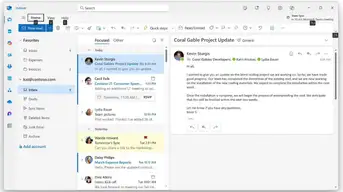
该信息与您的实际密码不同。然而,黑客可能会在后续攻击中利用它来冒充您。对于在工作中使用 Outlook 的人来说,这可能会暴露其账户可访问的公司资源。结果取决于网络的安全防护措施以及攻击者能否成功滥用该身份验证信息。以下是此事特别令人担忧的原因。该攻击不需要您将密码输入到伪造页面中。如果您的计算机能够连接到攻击者的网络位置,打开恶意文件即足以发动攻击。
The information differs from your actual password. However, hackers may be able to use it in a follow-up attack to impersonate you. For someone using Outlook at work, that could potentially expose company resources their account can access. The outcome depends on the network's security protections and whether the attacker can successfully misuse the authentication information. Here's what makes this especially concerning. The attack doesn't require you to type your password into a fake page. Opening the malicious file can be enough if your computer can connect to the attacker's network location.
微软表示,仅通过 Outlook 的预览窗格查看邮件不会触发这一特定漏洞。必须打开恶意文件攻击才会生效。
Microsoft says simply viewing the message through Outlook's Preview Pane does not trigger this particular vulnerability. Someone must open the malicious file for the attack to work.
微软已将 Outlook 修复程序纳入其 11 月“补丁星期二”安全更新中。该公司的核心版本修复了 1,093 个漏洞,其中包括 63 个被评为“严重”级别的漏洞。有趣的是,微软将这一特定 Outlook 漏洞归类为“中等”级别,给出的 CVSS 严重性评分为 10 分中的 6.5 分。然而,该评分只讲了故事的一部分。微软确认攻击者已利用该漏洞发动攻击。
Microsoft included the Outlook fix in its November Patch Tuesday security updates. The company's core release addressed 1,093 vulnerabilities, including 63 rated critical. Interestingly, Microsoft classified this particular Outlook vulnerability as moderate, giving it a CVSS severity score of 6.5 out of 10. However, that rating tells only part of the story. Microsoft confirms attackers have already exploited the flaw.
美国网络安全和基础设施安全局(CISA)也于 11 月 10 日将其列入“已知被利用漏洞”目录。换句话说,黑客已在利用这一安全弱点。微软未公开披露实施攻击者的身份,也未透露受影响人数。该公司亦未提供关于事件的详细信息。鉴于黑客已在利用该漏洞,尽快安装安全更新至关重要。根据微软的安全通报,受影响的产品包括:此次漏洞影响的是 Windows 电脑上的桌面版 Office 安装程序。
The Cybersecurity and Infrastructure Security Agency (CISA) also added it to its Known Exploited Vulnerabilities catalog on Nov. 10. In other words, hackers are already taking advantage of this security weakness. Microsoft has not publicly identified who carried out the attacks or disclosed how many people were affected. The company also hasn't provided detailed information about the incidents. With hackers already exploiting the flaw, it's important to install the security update as soon as possible. According to Microsoft's security advisory, the affected products include: The vulnerability concerns affected desktop Office installations on Windows computers.
微软的公告并未将网页浏览器中的 Outlook.com 或 Outlook 移动应用程序列为受影响产品。如果您的雇主管理您的 Microsoft 365 软件,您的 IT 部门可能会处理这些更新。不过,确认安全补丁已安装仍然很有必要。对于自行管理电脑的用户,以下是检查方法。
Microsoft's advisory does not list Outlook.com in a web browser or the Outlook mobile apps as affected products. If your employer manages your Microsoft 365 software, your IT department may handle these updates. However, it's worth confirming that the security fix has been installed. For people who manage their own computers, here's how to check.
您能做的最重要的事情就是更新 Microsoft Office。此外,采取一些额外的预防措施有助于减少您接触可疑文件和遭受账户攻击的风险。
The most important thing you can do is update Microsoft Office. However, a few additional precautions can help reduce your exposure to suspicious files and account attacks.
微软已发布针对该漏洞的安全更新。您可以在受支持的 Windows 版 Office 中手动检查更新。
Microsoft has released security updates addressing the vulnerability. You can manually check for updates in supported Windows versions of Office.
如果您没有看到“立即更新”(Update Now),则可能需要先选择“启用更新”(Enable Updates)。如果整个“更新选项”(Update Options)菜单缺失,说明您的雇主可能对更新进行了集中管理。请联系您的 IT 部门,不要想当然地认为软件已经打过补丁。您也可以查阅微软官方的 Office 更新说明。
If you don't see Update Now, you may need to select Enable Updates first. If the entire Update Options menu is missing, your employer may manage updates centrally. Contact your IT department rather than assuming the software has already been patched. You can also review Microsoft's official Office update instructions.
安装更新后,您可以检查电脑上运行的是哪个版本的 Office。
After installing the update, you can check which version of Office is running on your computer.
对于受影响的批量许可安装,微软 11 月 10 日发布的安全更新包含以下更新后的版本号:这些版本号适用于指定的 LTSC 版本。它们不应用于检查其他 Office 版本。如果您使用的是企业版 Microsoft 365 应用(Microsoft 365 Apps for Enterprise),正确的版本号取决于您所在组织的更新渠道。您可以查看微软的 Office 安全发布说明或联系您的 IT 部门以确认修复情况。
For affected volume-licensed installations, Microsoft's November 10 security release includes these updated builds: These build numbers apply to the specified LTSC editions. They shouldn't be used to check other Office versions. If you're using Microsoft 365 Apps for Enterprise, the correct build depends on your organization's update channel. You can check Microsoft's Office security release notes or contact your IT department to confirm the fix.
尽管此漏洞需要通过 Office 修复,但保持 Windows 更新依然很重要。在 Windows 11 上:接下来,检查 Windows 是否可以接收其他微软产品的更新。
Although this vulnerability requires an Office fix, keeping Windows updated remains important. On Windows 11: Next, check whether Windows can receive updates for other Microsoft products.
这有助于 Windows 为受支持的微软产品提供更新。然而,部分 Office 安装程序通过独立服务或雇主管理的系统接收更新。请记住,仅检查 Windows 更新可能无法确认您已安装特定的 Outlook 修复程序。请单独检查 Office。在安装主要的操作系统更新之前,备份重要文件也是明智之举。
This can help Windows deliver updates for supported Microsoft products. However, some Office installations receive updates through separate services or employer-managed systems. Remember that checking Windows Update alone may not confirm you've installed the specific Outlook fix. Check Office separately. It's also smart to back up important files before installing major operating system updates.
来自陌生发件人的邮件文件需要格外谨慎,尤其是当您并未预期收到此类邮件时。请留意以 .msg 结尾的附件,这是保存 Outlook 邮件的常用文件格式。该格式本身是合法的,但攻击者可能会滥用它来实施此漏洞攻击。如果某封电子邮件声称您需要打开附件中的消息以查看发票或紧急工作请求,请通过其他可信渠道进行核实。即使是看起来来自同事的附件,如果请求显得不同寻常,也值得再三确认。
A message file from an unfamiliar sender deserves extra caution, especially if you weren't expecting it. Watch for attachments ending in .msg , a common file format for saved Outlook messages. The format itself is legitimate. However, attackers can abuse it to deliver this exploit. If an email claims you need to open an attached message to review an invoice or urgent workplace request, verify it through another trusted channel. Even attachments appearing to come from coworkers deserve a second look when the request seems unusual.
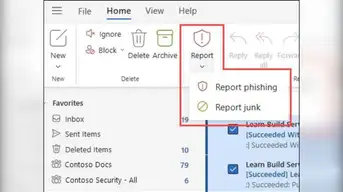
如果发现可疑之处,请避免打开附件。相反,在 Outlook 内置报告工具可用时,请使用该工具报告此邮件。在受支持的 Outlook 版本中:具体的菜单位置取决于您的 Outlook 版本及雇主的设置。如果您使用的是工作账户且未看到报告选项,请联系您的 IT 部门。避免将可疑附件转发给其他同事。
If something looks suspicious, avoid opening the attachment. Instead, report the message using Outlook's built-in reporting tools when available. In supported versions of Outlook: The exact menu location depends on your Outlook version and your employer's settings. If you're using a work account and don't see a reporting option, contact your IT department. Avoid forwarding the suspicious attachment to other coworkers.
强大的杀毒软件有助于在可疑附件和恶意活动造成进一步损害之前将其识别出来。请寻找包含实时扫描和基于行为检测功能的防护软件。这些功能可能有助于捕获传统病毒特征码无法识别的威胁。然而,杀毒软件无法替代微软的安全补丁。安装 Outlook 更新对于修复这一特定漏洞仍然至关重要。您可以在 CyberGuy.com 获取我为您挑选的 2026 年度最佳杀毒防护软件,适用于您的 Windows、Mac、Android 和 iOS 设备。
Strong antivirus software can help identify suspicious attachments and malicious activity before they cause further damage. Look for protection that includes real-time scanning and behavior-based detection. These features may help catch threats that traditional virus signatures miss. However, antivirus software cannot replace Microsoft's security patch. Installing the Outlook update remains essential for closing this particular vulnerability. Get my picks for the best 2026 antivirus protection winners for your Windows, Mac, Android and iOS devices at CyberGuy.com.
多因素认证(MFA)会在你……时要求进行额外验证,从而为账户增加一层保护。只要支持,就请在微软账户及其他重要服务上启用它。需要记住的是,MFA可能无法阻止那些涉及窃取Windows身份验证信息的攻击。这也是更新Outlook更为优先的另一个原因。
Multifactor authentication (MFA) adds another layer of account protection by requiring additional verification when you. Enable it on your Microsoft account and other important services whenever available. Keep in mind that MFA may not stop attacks involving stolen Windows authentication information. That's another reason updating Outlook takes priority.
如果你最近打开了某封意料之外的Outlook邮件附件,不要因为屏幕上没有出现任何异常就以为一切正常。以下是接下来该做的事。
If you recently opened an unexpected Outlook message attachment, don't assume everything is fine because nothing unusual appeared on your screen. Here's what to do next.
一个重要提醒:仅更改密码可能无法消除这一漏洞带来的所有潜在风险。如果你是在工作电脑上打开该附件的,请让你的IT团队判断是否需要采取额外的安全措施。
One important reminder: Changing your password alone may not address every potential exposure from this vulnerability. If you opened the attachment on a work computer, let your IT team determine whether additional security measures are necessary.
微软11月的安全更新涵盖的内容远不止Outlook。它还修复了一些漏洞,攻击者可利用这些漏洞获取额外权限或远程执行恶意代码。对每天使用Windows电脑的人来说,漏洞数量之多可能听起来让人不知所措。不过,并非每个漏洞都带来同样紧迫的风险。就此次而言,Outlook的漏洞值得你关注,因为微软已确认该漏洞正被活跃利用。
Microsoft's November security release covers far more than Outlook. It also fixes weaknesses that could allow attackers to gain additional privileges or remotely execute malicious code. For those of you using a Windows PC every day, the sheer number of vulnerabilities may sound overwhelming. However, not every flaw carries the same immediate risk. In this case, the Outlook weakness deserves your attention because Microsoft has confirmed active exploitation.
更令人担忧的是,恶意文件利用可信软件竟如此容易。Outlook是无数企业日常沟通的一部分,打开已保存的电子邮件看起来似乎无害。这一漏洞表明,为什么保持Office更新应当与更新Windows受到同样的重视。
The larger concern is how easily a malicious file can take advantage of trusted software. Outlook is part of everyday communication for countless businesses, and opening saved email messages may seem harmless. This vulnerability shows why keeping Office updated deserves the same attention as updating Windows.
这个Outlook漏洞让我担心的地方在于,用户几乎不需要做什么,自己的信息就会陷入风险。你可能收到一个看起来像日常工作附件的文件,打开后就在不知不觉中泄露了信息,而这些信息能帮黑客冒充你。没有任何明显警告告诉你出了差错。等你意识到的时候,损害可能已经造成。还有一点也让我不安:攻击者已经在利用这个漏洞,微软却仍将其评为中等严重级别。
What concerns me about this Outlook flaw is how little someone has to do to put their information at risk. You could receive what looks like a routine work attachment, open it and unknowingly expose information that helps a hacker impersonate you. There's no obvious warning telling you something went wrong. And by the time you realize it, the damage may already be done. I also find it troubling that Microsoft rated this vulnerability moderate even though attackers were already exploiting it.
大多数人不会整天去翻看安全评级,他们也不该需要这么做。他们需要的是能保护自己的软件,以及装起来方便的更新。我的建议很简单:如果你在Windows电脑上使用Outlook,今天就检查一下Office更新。别以为你的电脑已经替你处理好了。
Most people aren't going to spend their day reviewing security ratings, and they shouldn't have to. They need software that protects them and updates that are easy to install. My advice is simple. If you use Outlook on a Windows computer, check for Office updates today. Don't assume your computer has already taken care of it.
微软是否应该采取更多措施,防止单个恶意Outlook文件泄露你的信息?还是你认为保持软件更新就足以提供保护?
Should Microsoft be doing more to prevent a single malicious Outlook file from exposing your information, or do you think keeping your software updated is enough protection?