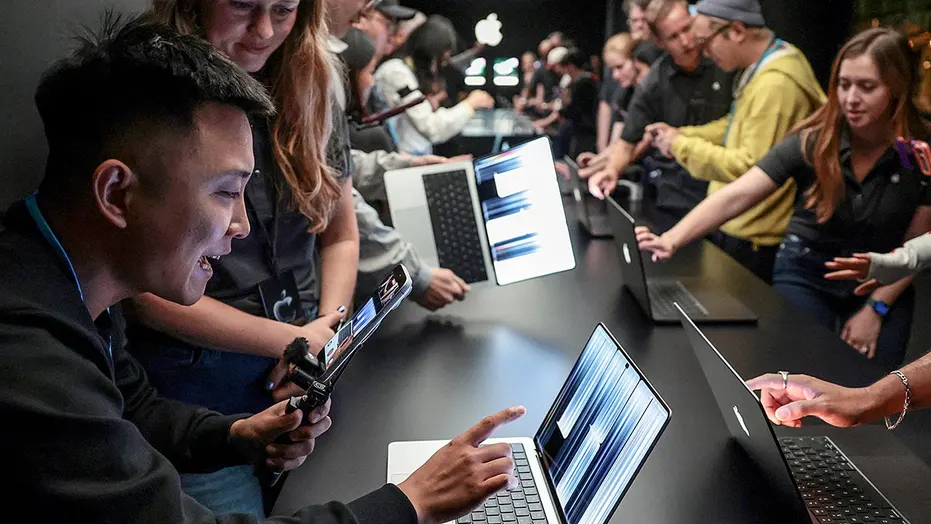
苹果终于为MacBook Pro带来了许多人多年来一直想要的功能:触摸屏。该公司于10月28日发布了首款触摸屏MacBook Pro,为使用其笔记本电脑引入了一种新的交互方式。它还配备了惊艳的OLED显示屏、更薄的设计和强大的处理性能。然而,有一个细节可能会让你在掏钱包之前三思。新款触摸屏MacBook Pro起售价为2899美元。
Apple has finally given the MacBook Pro something many people have wanted for years: a touchscreen. The company unveiled its first touchscreen MacBook Pro on Oct. 28, introducing a new way to interact with its laptop. It also brings a stunning OLED display, a thinner design and some serious processing power. However, there's one detail that might make you think twice before reaching for your wallet. The new touchscreen MacBook Pro starts at $2,899.
对于一台笔记本电脑来说,这是一笔不小的开支,即使以苹果的标准来衡量也是如此。那么,这个价格到底能让你得到什么?更重要的是,触摸MacBook屏幕是否足以带来改变,让你有理由升级?让我们来看看苹果推出了什么,以及谁可能从中受益最多。
That's a lot of money for a laptop, even by Apple's standards. So, what exactly are you getting for that price? More importantly, will touching your MacBook's screen make enough of a difference to justify an upgrade? Let's look at what Apple has introduced and who might benefit most.
我们的免费“网络高手”直播课程《更聪明旅行、更省钱的5种方法》已经结束,但你仍然可以观看完整回放。库尔特“网络高手”克努特森将带你了解五种实用方法:保护手机和个人信息、避免常见的旅行骗局、找到更好的优惠、在预订上省钱,以及利用技术让旅行更轻松、压力更小。无需任何技术经验。我们从苹果2026年发布会了解到的8件大事多年来,苹果一直坚称Mac与键盘和触控板搭配使用效果最佳。
Our free CyberGuy LIVE class, 5 Ways to Travel Smarter and Save Money, has ended, but you can still watch the full replay. Kurt "CyberGuy" Knutsson walks you through five practical ways to protect your phone and personal information, avoid common travel scams, find better deals, save money on bookings and use technology to make your travels easier and less stressful. No technical experience is needed. 8 BIGGEST THINGS WE LEARNED FROM APPLE'S 2026 EVENT For years, Apple maintained that the Mac worked best with a keyboard and trackpad.
与此同时,Windows笔记本电脑用户早已长时间享有触摸屏选项。苹果甚至通过Touch Bar(触控栏)尝试过触控功能,但这一功能从未取代传统的笔记本电脑体验。
Meanwhile, Windows laptop owners have enjoyed touchscreen options for a long time. Apple even experimented with touch controls through its Touch Bar, but that feature never replaced the traditional laptop experience.
如今苹果改变了方向。新款配备PROLED XDR显示屏的MacBook Pro让你可以直接与屏幕交互。你可以用手指滚动浏览网页,或双指捏合放大照片。苹果还允许你在窗口之间拖移内容,并与受支持的创意应用互动。
Now Apple has changed course. Its new MacBook Pro with PROLED XDR Display lets you interact directly with the screen. You can scroll through websites with your finger or pinch to zoom into photos. Apple also lets you drag content between windows and interact with supported creative apps.
想想你有多经常下意识地去触摸笔记本电脑屏幕,尤其是在用了多年iPhone或iPad之后。如今,这一手势在全新的MacBook Pro上终于能真正发挥作用了。苹果还重新设计了铰链,让你在触摸屏幕时显示屏更稳固。这是一个贴心的改进,因为没人希望每次点按按钮时屏幕都晃来晃去。
Think about how often you instinctively touch your laptop screen, especially after spending years using an iPhone or iPad. Now that gesture will actually do something on the new MacBook Pro. Apple also redesigned the hinge to keep the display steadier when you touch it. That's a thoughtful addition because nobody wants a screen wobbling every time they tap a button.
不过,这仍然是一台传统笔记本电脑。它不能折叠成平板电脑,也不支持Apple Pencil。你在大部分工作中仍要使用键盘和触控板。这可能会让那些希望用一台设备同时取代MacBook和iPad的人感到失望。
However, this remains a traditional laptop. It doesn't fold into a tablet, and it doesn't support Apple Pencil. You'll still use the keyboard and trackpad for much of your work. That may disappoint anyone hoping to replace both a MacBook and an iPad with one device.
就在所有人都在谈论触摸屏的时候,苹果的新显示技术对你的日常体验可能产生更大的影响。该公司称之为PROLED XDR显示屏,它采用串联OLED技术。与依赖背光的传统笔记本电脑屏幕不同,OLED像素自行发光。这使显示屏能够呈现深邃的黑色和明亮的高光,而不会出现背光带来的泛白。
While everyone is talking about the touchscreen, Apple's new display technology might have an even greater impact on your everyday experience. The company calls it the PROLED XDR display, and it uses tandem OLED technology. Unlike traditional laptop screens that rely on a backlight, OLED pixels produce their own light. That allows the display to show deep blacks alongside bright highlights without the same backlight glow.
苹果表示,新屏幕在显示HDR和SDR内容时峰值亮度均可达到2000尼特。它还宣称具备10000000:1的对比度,并支持最高120Hz的刷新率,使画面运动更流畅。这些数字听起来很惊艳,但你实际会注意到什么?
Apple says the new screen reaches up to 2,000 nits of peak brightness for both HDR and SDR content. It also delivers a claimed 10,000,000:1 contrast ratio and supports refresh rates up to 120Hz for smoother motion. Those numbers sound impressive, but what will you actually notice?
照片应该看起来更鲜艳,尤其是当你查看用iPhone拍摄的照片时。电影在暗场景中能展现更多细节。如果你编辑视频或从事摄影工作,改进后的色彩准确度可能尤其有用。
Photos should look more vibrant, especially when you're viewing pictures taken on your iPhone. Movies can show more detail in dark scenes. If you edit videos or work with photography, the improved color accuracy could be especially useful.
苹果还添加了防反射涂层,以帮助减少眩光。可选的纳米纹理饰面为在明亮环境中工作的人提供额外的反射控制。对于长时间盯着笔记本电脑屏幕的人来说,这些改进可能比单纯的触摸功能更有价值。
Apple has also added an antireflective coating to help reduce glare. An optional nano-texture finish provides additional reflection control for people who work in bright environments. For someone who spends hours looking at a laptop screen, these improvements could be more valuable than touch alone.

苹果在性能上毫不保留。新款触屏MacBook Pro搭载M5 Pro或M5 Max处理器。这两款芯片都面向需要比普通笔记本电脑更强处理能力的用户。如果你要剪辑高分辨率视频或处理大型照片库,这些芯片正是为应对这类工作负载而设计的。苹果还提供最高128GB统一内存和16TB存储的配置。不过,这些升级会让价格大幅上涨。
Apple isn't holding back on performance. The new touchscreen MacBook Pro comes with either an M5 Pro or M5 Max processor. Both target people who need more processing power than a basic laptop typically provides. If you're editing high-resolution video or working with large photo libraries, these chips are designed to handle that workload. Apple also offers configurations with up to 128GB of unified memory and 16TB of storage. However, those upgrades can drive the price considerably higher.
新款MacBook Pro运行macOS 27,并内置Apple Intelligence以及苹果升级后的Siri AI。它还首次将灵动岛引入Mac。这个iPhone上为人熟知的功能位于显示屏顶部附近,可让你查看实时更新并使用实用控件。在视频通话方面,苹果配备了1200万像素的人物居中摄像头。同时,升级后的六扬声器系统承诺带来更深沉的低音。这款笔记本还提供雷雳5连接和HDMI端口,这对需要连接外接显示器的人来说应该很有吸引力。
The new MacBook Pro runs macOS 27 and includes Apple Intelligence alongside Apple's upgraded Siri AI. It also brings Dynamic Island to the Mac for the first time. That familiar feature from the iPhone sits near the top of the display and gives you access to live updates and useful controls. For video calls, Apple includes a 12-megapixel Center Stage camera. Meanwhile, an upgraded six-speaker system promises deeper bass. The laptop also includes Thunderbolt 5 connectivity and an HDMI port, which should appeal to people connecting external displays.
关于触屏笔记本电脑的一大担忧是,所有这些额外技术是否会让机身更重。苹果表示,它成功做到了相反的方向。新款14英寸触屏MacBook Pro重约3磅,比上一代轻了大约半磅。16英寸机型重4磅,轻了约0.7磅。两款机型的设计也更纤薄。这应该能让人们在会议之间携带MacBook Pro或打包出行时更轻松一些。
12 BIGGEST APPLE WWDC 2026 TAKEAWAYS YOU NEED TO KNOW One concern with touchscreen laptops is whether all that additional technology makes them heavier. Apple says it has managed to move in the opposite direction. The new 14-inch touchscreen MacBook Pro weighs about three pounds, roughly half a pound less than its predecessor. The 16-inch model comes in at four pounds, approximately 0.7 pounds lighter. Both models also feature slimmer designs. That should make carrying a MacBook Pro between meetings or packing one for a trip a little easier.
苹果承诺续航最长可达24小时,具体取决于配置和使用情况。对于一台性能如此强劲、屏幕如此明亮的机器来说,这一说法令人印象深刻。不过,我们还需要独立测试来了解电池续航在真实工作场景中的表现。
Apple promises up to 24 hours of battery life, depending on the configuration and usage. That's an impressive claim for a machine with this much performance and such a bright display. However, we'll need independent testing to see how battery life holds up during real-world work.
苹果已将其触屏MacBook Pro明确置于高端定位。搭载M5 Pro芯片的14英寸机型起售价为2899美元,16英寸版本起售价为3399美元。如果想要更强大的M5 Max处理器,14英寸机型的价格将升至4499美元,16英寸版本则为4799美元。而且要记住,这些只是各配置的起售价。增加内存或存储空间会大幅推高总价。
Apple has positioned its touchscreen MacBook Pro firmly in premium territory. The 14-inch model with the M5 Pro chip starts at $2,899, while the 16-inch version starts at $3,399. If you want the more powerful M5 Max processor, prices jump to $4,499 for the 14-inch model and $4,799 for the 16-inch version. And remember, those are starting prices for each configuration. Adding more memory or storage can increase the total substantially.
还有一个重要细节。苹果于10月27日推出了另一款搭载更新M6芯片的14英寸MacBook Pro。该机型起售价为1999美元,但使用的是不支持触控的Liquid Retina XDR显示屏。这意味着,苹果入门级M6 MacBook Pro与其最便宜的触屏机型之间存在900美元的差价。当然,价格更高的版本还配备了M5 Pro处理器和升级后的OLED显示屏。这些是不同的性能配置,因此多出的900美元并不代表触控功能本身的成本。
There is another important detail. Apple introduced a separate 14-inch MacBook Pro with its newer M6 chip on Oct. 27. That model starts at $1,999, but it uses a Liquid Retina XDR display without touch support. That means you're looking at a $900 difference between Apple's entry-level M6 MacBook Pro and its least expensive touchscreen model. Of course, the more expensive version also includes an M5 Pro processor and the upgraded OLED display. These are different performance configurations, so the additional $900 doesn't represent the cost of touch alone.
换个角度看,此前搭载M5 Pro芯片的14英寸MacBook Pro起售价为2499美元。这使得新款触屏版本比其对应的前代产品贵了400美元。不过,这仍为你提供了一个有意义的选择。如果你不需要直接与屏幕交互,可以以低得多的价格买到一台性能强劲的新款MacBook Pro。我们此前曾报道过,AI芯片成本上涨如何推高了苹果的产品价格。此次最新发布为本就昂贵的产品线又增添了一个高端选项。
For another perspective, the previous 14-inch MacBook Pro with the M5 Pro chip started at $2,499. That makes the new touchscreen version $400 more expensive than its comparable predecessor. Still, this gives you a meaningful choice. You can buy a powerful new MacBook Pro for considerably less if you don't need to interact directly with the screen. We've previously reported on how rising AI chip costs have pushed Apple prices higher. This latest introduction adds another premium option to an already expensive lineup.
苹果表示,许多现有的Mac应用将能立即响应触摸操作,因为macOS可以将手指轻点转换为鼠标点击。即便在开发者尚未完全优化软件之前,这也能让基本交互变得简单直接。然而,苹果更大的野心在于创意类应用。该公司在Final Cut Pro中演示了触摸控制功能,让剪辑师可以直接在屏幕上操作片段。音乐人则可以用Logic Pro用手指演奏虚拟乐器。
Apple says many existing Mac apps will respond to touch immediately because macOS can translate finger taps into mouse clicks. That should make basic interaction straightforward, even before developers fully optimize their software. However, Apple's bigger ambition involves creative applications. The company demonstrated touch controls in Final Cut Pro that let editors manipulate clips directly on the screen. Musicians can use Logic Pro to play virtual instruments with their fingers.
苹果还预计,包括Adobe Lightroom和微软Office系列应用在内的第三方应用也将利用新的触摸功能。这听起来很有前景。不过,触摸屏并不会自动让每个应用都更易用。当你试图用手指精确选择某个东西时,微小的按钮和拥挤的菜单可能会让人感到沮丧。
Apple also expects third-party apps, including Adobe Lightroom and Microsoft Office applications, to take advantage of the new touch capabilities. That sounds promising. Still, a touchscreen doesn't automatically make every app easier to use. Tiny buttons and crowded menus can be frustrating when you're trying to select something precisely with a finger.
早期的上手体验报告显示,触摸在常见手势下运行流畅。然而,一些较小的macOS控件仍然不太好点按。这些只是初步印象,而非经过长时间测试得出的结论。开发者能以多快的速度适配他们的界面,以及人们在最初的新鲜感消退后是否会继续经常使用触摸功能,这些都值得关注。
Early hands-on reports suggest that touch works smoothly for common gestures. However, some smaller macOS controls can still be awkward to tap. Those are preliminary impressions rather than findings from extended testing. It will be interesting to see how quickly developers adapt their interfaces and whether people continue using touch regularly after the initial excitement wears off.
这是我在花费近3000美元之前会问的问题。如果你已经拥有一台相对较新的MacBook Pro,能够应对你交给它的所有任务,我不会仅仅为了触摸屏功能而急于更换它。鼠标或触控板仍然能给你出色的控制力,尤其是在处理精细项目时。
This is the question I'd ask before spending nearly $3,000. If you already own a relatively recent MacBook Pro that handles everything you throw at it, I wouldn't rush to replace it solely for touchscreen capabilities. A mouse or trackpad still gives you excellent control, especially when you're working on detailed projects.
然而,如果你是专业视频剪辑师,或者每天都要处理照片,OLED显示屏可能会带来真正的不同。便携性的提升也让新款机型对经常带着高负载工作出行的人颇具吸引力。对于电子邮件和网页浏览等日常活动,价格更低的MacBook Air或标准版MacBook Pro可能就绰绰有余了。
However, if you edit video professionally or spend your days working with photos, the OLED display could make a real difference. The improved portability also makes the new model appealing to people who regularly travel with demanding workloads. For everyday activities like email and web browsing, a less expensive MacBook Air or standard MacBook Pro will probably be more than enough.
在做出这个决定之前,不妨看看我们的指南,了解如何判断何时该更换你的Mac。一台性能依然良好的电脑可能还能再用好几年。你也可以在CyberGuy.com上浏览我们评选的2026年最佳笔记本电脑,在决定入手苹果的高端机型之前先比较其他选择。
Before making that decision, take a look at our guide explaining how to know when it's time to replace your Mac. A computer that still performs well may have several good years left. You can also explore our best laptops for 2026 at CyberGuy.com to compare other options before committing to Apple's premium model.
还有一点建议:如果你正在考虑那款触屏MacBook Pro,不妨在11月6日它上市时去一趟苹果零售店。花些时间在键盘和触控板旁实际操作一下触屏。这种亲身体验可能比任何规格表都更能说明问题。
One more suggestion: If you're considering the touchscreen MacBook Pro, visit an Apple Store when it becomes available on Nov. 6. Spend some time using the touchscreen alongside the keyboard and trackpad. That hands-on experience could tell you more than any specification sheet.
如果你要花近3000美元买一台新的MacBook Pro,保护这笔投资应当是优先事项。虽然macOS内置了安全功能,但Mac仍然可能面临恶意下载和网络诈骗。我建议保持软件更新,并使用强力杀毒软件作为额外一层防护。强力杀毒软件可以帮助检测恶意软件,并在危险网站造成麻烦之前向你发出警告。在CyberGuy.com上获取我评选的2026年最佳杀毒软件,适用于你的Windows、Mac、Android和iOS设备。
If you're spending nearly $3,000 on a new MacBook Pro, protecting that investment should be a priority. While macOS includes built-in security features, Macs can still face malicious downloads and online scams. I recommend keeping your software updated and using strong antivirus software for an additional layer of protection. Strong antivirus software can help detect malware and warn you about dangerous websites before they cause trouble. Get my picks for the best 2026 antivirus protection winners for your Windows, Mac, Android and iOS devices at CyberGuy.com.
我必须称赞苹果,终于把触屏带到了MacBook Pro上。这感觉像是一个多年前就该出现的功能,尤其是我们都已经如此习惯触摸手机和平板的屏幕。苹果对其新款OLED显示屏所承诺的表现也让我印象深刻。对于从事视觉内容工作的人来说,这可能是升级的最有说服力的理由。
I have to give Apple credit for finally bringing a touchscreen to the MacBook Pro. It feels like a feature that should have arrived years ago, especially when we're all so accustomed to touching the screens on our phones and tablets. I'm also impressed by what Apple is promising with its new OLED display. For people who work with visual content, that could be the most compelling reason to upgrade.
但这也是我犹豫的地方。售价2899美元,苹果为一项许多竞争笔记本多年前就已提供的功能要价不菲。而标准版M6 MacBook Pro起售价为1999美元,省下那多出的900美元是相当有说服力的理由。在称其为必买升级之前,我想先看看触控在日常工作中到底有多实用。我的建议是,花钱之前先亲自试一试。触控屏听起来很棒,但真正的考验是,新鲜劲过去之后你还会不会去用它。
But here's where I hesitate. At $2,899, Apple is asking a lot for a feature that many competing laptops have offered for years. And with the standard M6 MacBook Pro starting at $1,999, there's a pretty compelling argument for saving that extra $900. I want to see how useful touch becomes in everyday work before calling this a must-have upgrade. My advice is to try it in person before spending the money. A touchscreen sounds great, but the real test is whether you still reach for it after the excitement wears off.
你愿意花近3000美元买一台触控屏MacBook Pro吗?欢迎写信到CyberGuy.com告诉我们你的理由或反对的理由。
Would you pay nearly $3,000 for a touchscreen MacBook Pro? Let us know why or why not by writing to us at CyberGuy.com.