有史以来最好的笔记本电脑显示屏,没有之一。刘海没了!触摸屏偶尔有用。携带起来轻多了。不知怎么的,扬声器还更好了。发光的苹果标志回归了。
The best laptop display ever made, bar none. The notch is gone! Having a touchscreen is occasionally useful. Much lighter to carry. Somehow, even better speakers. Glowing Apple logo returns.
不足:触摸屏的实现感觉半生不熟。价格高昂,性能却与去年的机型相同。
TIRED Touchscreen implementation feels half-baked. High price for the same performance as last year’s model.
苹果不常改变主意。它的历史就是坚持己见,即便在某些设计或技术决策上受到压力也是如此。然而,过去几天我一直在用一台带触摸屏的MacBook Pro——一台我从未想过会问世的设备。
Apple doesn’t change its mind very often. Its history is one of sticking to its guns, even when pressed on certain design or technology decisions. And yet, I’ve been working on a MacBook Pro with a touchscreen for the past few days—a device I never thought would come into being.
抛开过去关于触摸屏笔记本电脑人体工学糟糕的(非常合理的)论点不谈,苹果以一种我能想象到的最不苹果的方式,将这样的显示屏带到了MacBook Pro上。我不确定它为什么会出现,但它就是出现了。
Ignoring the (very reasonable) arguments about the poor ergonomics of touchscreen laptops made in the past, Apple has brought such a display to the MacBook Pro in the most un-Apple way I could have imagined. I’m not sure why it’s here, but it is.
不过,我确实知道,我喜欢新的“PROLED XDR”屏幕。再加上用于网络摄像头的打孔开孔,以及顶盖上发光苹果标志的回归——这些改进足以称其为MacBook产品线中其余机型之上的重大升级。但与一年前配置相近的MacBook Pro相比,这款OLED机型的价格要高出近1000美元。
I do know, though, that I love the new “PROLED XDR” screen. Combine that with a hole-punch cutout for the webcam and the return of the light-up Apple logo on the lid—and it's enough improvements to call this a big upgrade over the rest of the MacBook lineup. But compared to a similarly specced MacBook Pro from a year ago, the OLED model costs almost $1,000 more by comparison.
小小的点缀累积起来 摄影:卢克·拉森 随着OLED MacBook Pro的到来,苹果如今为其旗舰高端笔记本电脑提供了两种版本。标准的Mini-LED选项现在搭载M6处理器,图形性能和电池续航有所提升,但除此之外外观与之前基本一样。
Small Touches Add Up Photograph: Luke Larsen With the arrival of the OLED MacBook Pro, Apple now offers two flavors of its flagship premium laptop. The standard Mini-LED option now comes with the M6 processor with improved graphics and battery life, but otherwise looks largely the same as before.
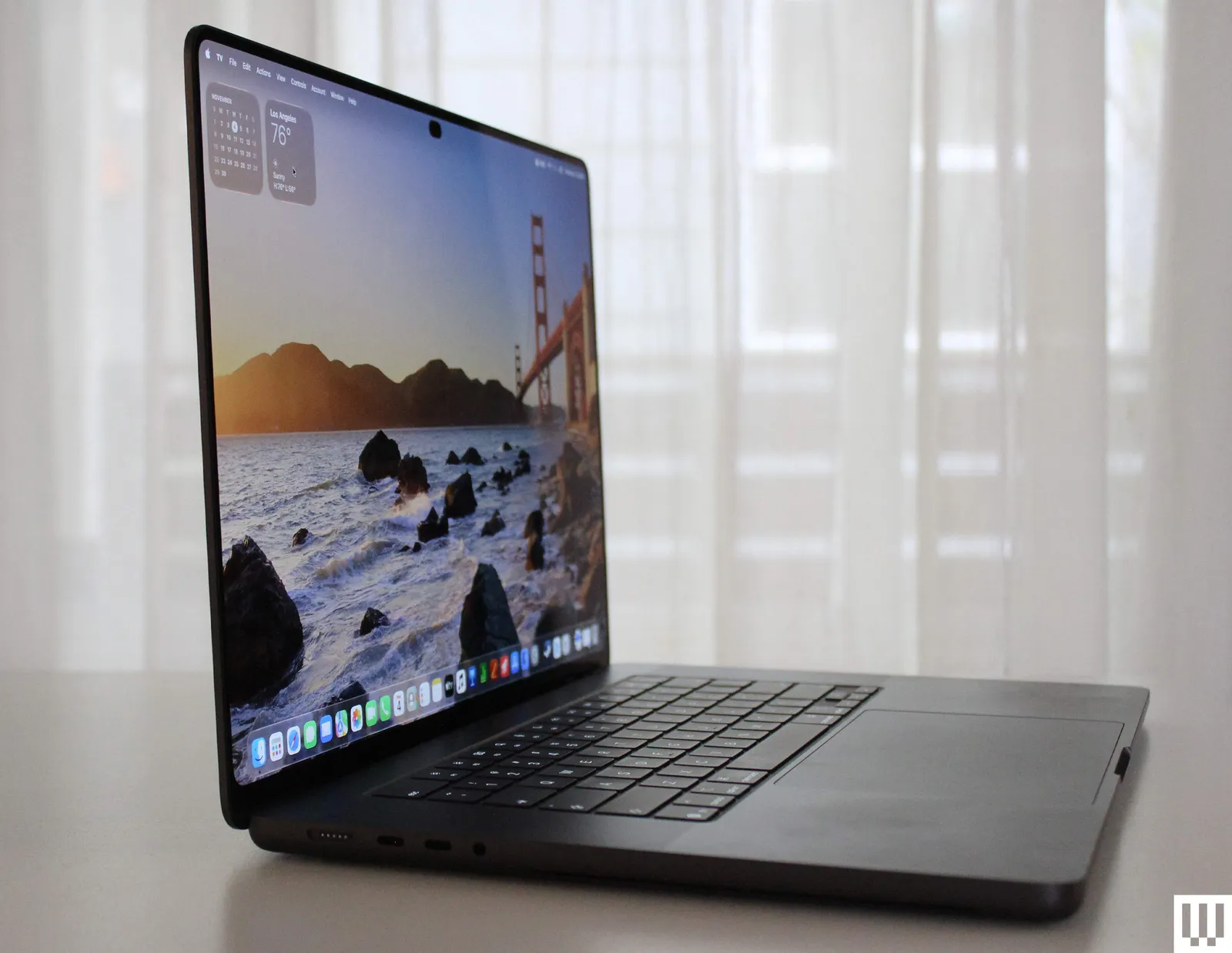
然而,OLED MacBook Pro是自2021年以来最大的变化。你不会立刻从外观上注意到它。颜色选项仍然只有银色和深空黑色。你仍然可以在14英寸和16英寸之间选择。端口也一样。打开它,你会看到熟悉的键盘和触控板。一切都如你所料。
The OLED MacBook Pro, however, is the biggest change since 2021. You won’t notice it immediately on the outside. Color options are still just Silver and Space Black. You still have a choice between 14- and 16-inch. Ports are the same. Open it up, and you’ll see the familiar keyboard and trackpad. It’s all there as you’d expect.
唯一能从视觉上看出你在用不一样的东西,就是顶盖上发光的苹果标志。作为只有价格高昂的OLED MacBook Pro才有的特征,它是一个纯粹而毫不掩饰的身份象征。我喜欢它。它甚至会匹配显示屏的亮度,所以在暗室里也不会分散注意力。
The only visual indication that you’re using something different is the glowing Apple logo on the lid. As a feature only available in the very expensive OLED MacBook Pro, it’s a pure, unabashed status symbol. And I love it. It even matches the display’s brightness, so it doesn’t distract in a dark room.
OLED MacBook Pro另一个可察觉的不同之处,是你用手而不是用眼睛会注意到的。我测试的16英寸机型现在仅重4磅,比非OLED版本轻了超过半磅。大部分减重来自OLED,它使用的层更薄、更轻(后面会详细讲OLED)。这是一台非常大的笔记本电脑,但重量减轻让它更容易放进包里携带。
Another discernible difference in the OLED MacBook Pro is something you’ll notice with your hands rather than your eyes. The 16-inch model I tested now weighs just 4 pounds, well over half a pound lighter than the non-OLED equivalent. Most of the weight savings come from OLED, which uses much thinner, lighter layers (more on OLED later). This is a very large laptop, but the weight reduction makes it much easier to carry around in a bag.
刘海没有了!苹果的设计元素中,没有哪个比屏幕顶部这个容纳摄像头和传感器的大缺口更让我困扰(非OLED机型仍然保留刘海)。打孔摄像头是巨大的改进。作为一个自刘海推出以来就一直觉得它完全碍眼的人,这可能是最让我兴奋的变化。和较新的iPhone一样,MacBook Pro也配备了灵动岛,让打孔摄像头更有用。它可以显示可交互的实时活动,比如计时器或正在播放的音乐。不过我想它不会经常被用到,但它通过遮住打孔并展示那些窄边框完成了自己的任务。
And the notch is gone! No Apple design feature has bothered me more than this large cutout at the top of the screen, which houses the webcam and sensors (it remains in the non-OLED model). The punch-hole camera is a huge improvement. As someone who found the notch a complete eyesore since it was introduced, this might be the change I’ve been most excited about. Like on newer iPhones, the MacBook Pro is also getting Dynamic Island, which makes the punch-hole camera more useful. It can show interactive Live Activities, such as timers or currently-playing music. I imagine it won’t be used too often, though it does its job by hiding the punch-hole and showing off those narrow bezels.
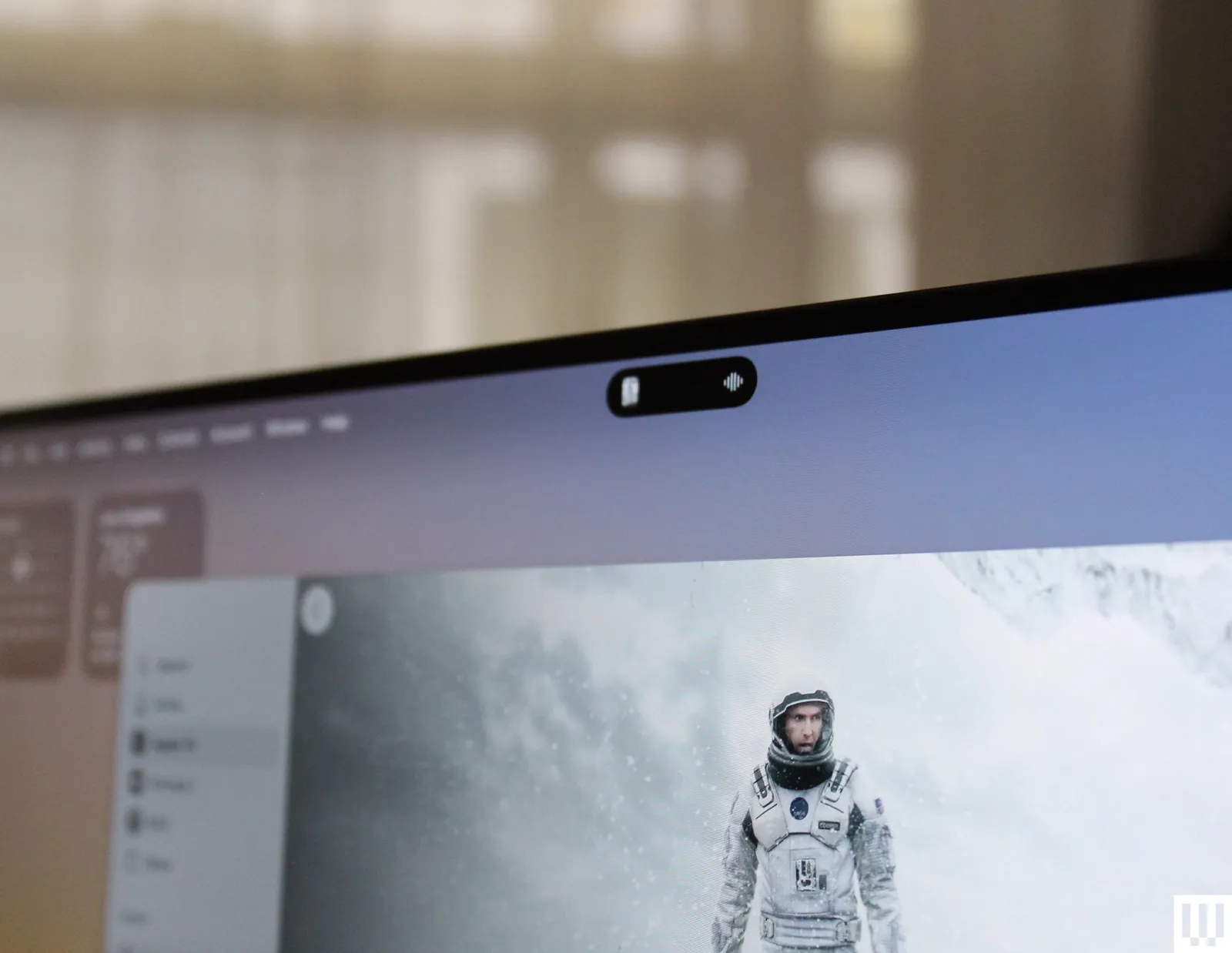
还有一些更细微的调整。底部的橡胶脚垫边缘更柔和、更圆润。屏幕周围的边框略微变窄。
There are some subtler tweaks. The rubber feet on the bottom have softer, rounded edges. The bezels around the screen are slightly smaller.
更明亮的OLED屏幕。距离苹果首次将串联OLED显示屏引入iPad Pro已过去两年多。在此期间,MacBook Pro用户一直耐心地使用着同样的Mini-LED显示屏。尽管如此,OLED MacBook Pro终于问世了,苹果也将串联OLED面板推向了前所未有的高度。这是我测试过的最亮的笔记本电脑显示屏,在SDR内容下最高可达1000尼特。这适用于整个操作系统以及所有应用中的日常内容。不过,这块屏幕可以输出高达2000尼特的亮度——但仅限于特定情况。
Even Brighter OLED It’s been over two years since Apple first brought its tandem OLED displays to the iPad Pro. In that time, MacBook Pro users have been patiently using the same Mini-LED display. Nevertheless, the OLED MacBook Pro has finally arrived, and Apple has pushed the tandem OLED panel further than ever before. This is the brightest laptop display I’ve ever tested, capable of reaching up to 1,000 nits in SDR. That’s on everyday content throughout the operating system and across all apps. The screen can, however, crank out 2,000 nits of brightness—but only in specific circumstances.
例如,在非常明亮的光线下或户外,网络摄像头模块中内置的环境光传感器会检测到这些条件,并将显示屏的亮度调至超过1000尼特的上限。再搭配可选的纳米纹理屏幕,这无疑是在户外工作的最佳笔记本电脑。考虑到眩光是典型OLED笔记本电脑屏幕的一大问题,这一点尤其令人印象深刻。(你需要开启“自动调节亮度”设置,而我通常不会开启。)
For example, under very bright light or outdoors, the ambient light sensor built into the webcam module will detect those conditions and tune the display beyond the 1,000-nit upper limit. Combine that with the optional nano-texture screen, and you have what is undoubtedly the best laptop for working outside. That’s especially impressive considering glare is a big problem with typical OLED laptop screens. (You’ll need to turn on the “Automatically adjust brightness” setting, which I typically don’t.)
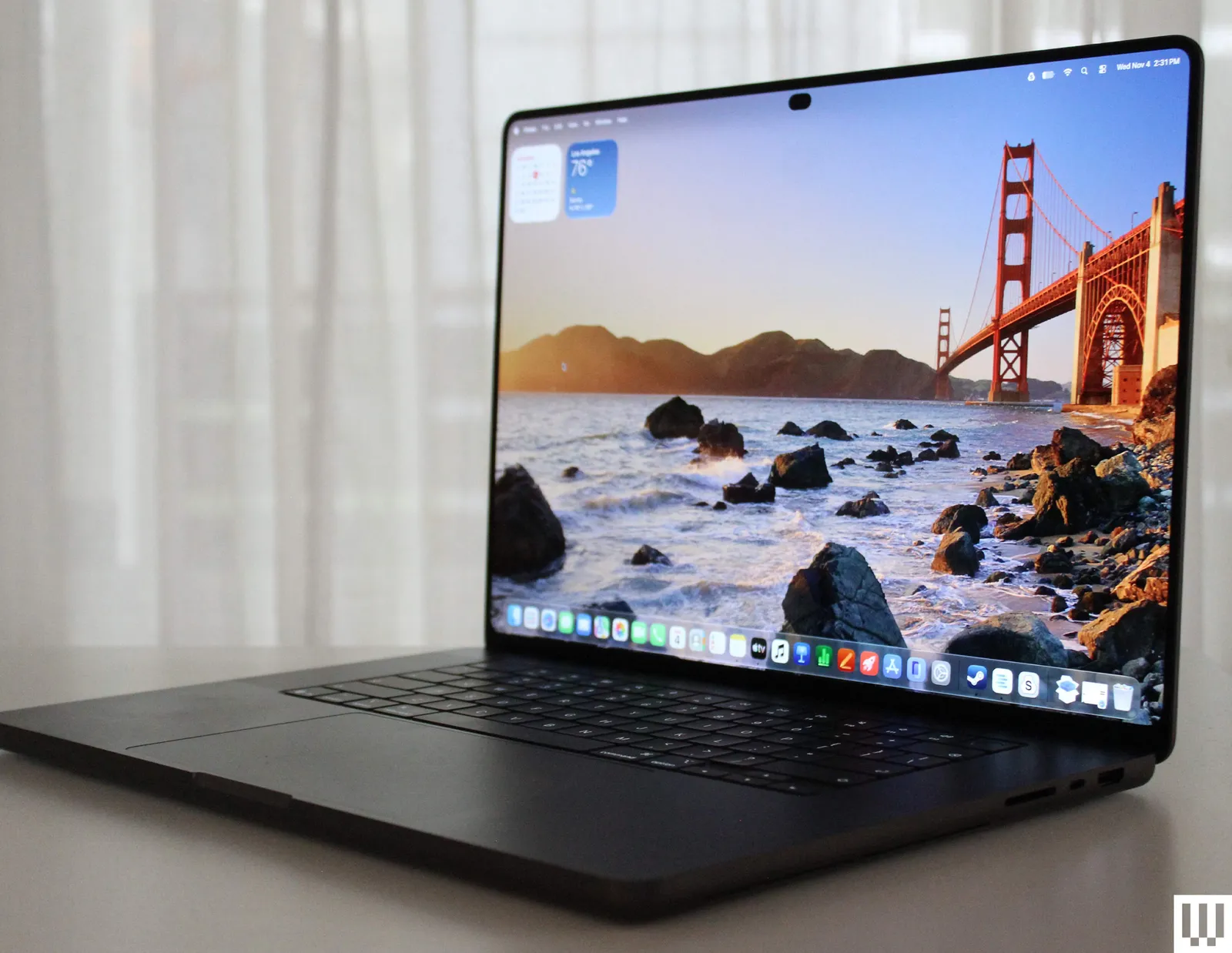
苹果寄给我用于测试的是配备标准玻璃的OLED机型,其表面带有该公司称之为“突破性”的防反射涂层。与同样非OLED的M6 MacBook Pro相比,它的反光程度看起来差不多。如果你真的想在户外使用这台设备,纳米纹理升级非常值得。
Apple sent me the OLED with standard glass for testing, which comes with an anti-reflective coating that the company calls “ground-breaking." Next to the non-OLED M6 MacBook Pro, it looks about as reflective. If you really want to use this thing outside, the nano-texture upgrade is well worth it.
HDR内容是屏幕峰值亮度可提升至2000尼特的第二种情况。这里的目的不是用亮度刺激眼睛,而是关于细节。在HDR渲染的照片、视频、电影和游戏中,2000尼特的亮度足以呈现令人难以置信的细节深度和色彩。我从未在笔记本电脑上见过这样的HDR效果,必须亲身体验才能真正感受到。在我的HDR测试中,我的OLED版MacBook Pro始终未能达到2000尼特,最高只到1849尼特。
HDR content is the second situation in which the screen can be cranked up to 2,000 nits of peak brightness. Here, the idea isn’t to blast your eyes with brightness; it’s about details. In HDR-rendered photos, videos, movies, and games, 2,000 nits would be bright enough to deliver incredible depth of detail and color. I’ve never seen HDR like this on a laptop, and you really have to experience it to truly get it. In my HDR testing, my OLED MacBook Pro never quite reached 2,000 nits, maxing out at 1,849 nits.
但令人惊讶的是,它甚至可以在25%的窗口中实现这一亮度,全像素点亮时也能达到1025尼特。比这更亮的OLED屏幕,只有最新款的OLED电视才有。
But amazingly, it can even produce this in a 25 percent window, and 1,025 nits with every pixel lit up. The only place you’ll find brighter OLED is in the very latest OLED TVs.
不过,这实际上仅比Mini-LED版MacBook Pro亮12%。我重新测试了Mini-LED版本以进行对比。但当你将更亮的OLED屏幕与其能够呈现的深黑色相结合,你就拥有了绝对出色的HDR效果,为内容带来了笔记本电脑上前所未有的深度层次。
Now, this is actually only 12 percent brighter than the Mini-LED MacBook Pro, which I retested to make this comparison. But when you pair a brighter OLED screen with the deep blacks it can produce, you have absolutely stellar HDR, giving the content a range of depth never before seen on a laptop.
我观看了多段专业HDR素材,并与Mini-LED版MacBook Pro并排对比。这种差异非常明显。也许只有电视发烧友和摄像师才会在意?也许吧。Mini-LED版MacBook Pro本身已经是一款出色的观影笔记本电脑。我只能说,OLED版本明显更好。对于专业处理HDR素材的人来说,这应该能开辟新的可能性。我希望,随着这些支持HDR的设备普及,我们会看到更多HDR视频被制作出来——哪怕只是为了网络播放。
I watched a number of professional HDR footage, side-by-side with the Mini-LED MacBook Pro. That difference is very noticeable. Is it something only TV nerds and videographers will care about? Maybe. The Mini-LED MacBook Pro is already a great laptop for watching movies on. All I can say is the OLED model is noticeably better. And for those who work professionally with HDR footage, this should open up new possibilities. My hope is that, as these HDR-capable devices proliferate, we’ll see more HDR video produced—even just for the web.
扬声器也让OLED版MacBook Pro成为更出色的观影设备。苹果表示,这款六扬声器音响系统“低音深度提升50%”。这很难量化,但就像屏幕一样,当你将其与上一代机型并排对比时,你会注意到差异。低音确实更加突出,无论是听音乐还是看电影,都能带来更饱满的声音。而且要说明的是,苹果的扬声器在行业内已经是最好的。
The speakers also make the OLED MacBook Pro an ever better movie-watching device. Apple says the six-speaker sound system has “50 percent deeper bass.”That’s hard to measure, but like the screen, you notice a difference when you compare it side-by-side with the previous-gen model. The bass really does stand out more, giving you a fuller sound both for music-listening and movie-watching. And just to be clear: Apple already had the best speakers in the game.
像iPad一样。到目前为止,在我使用触屏MacBook Pro的这段时间里,我试着提醒自己它新增的能力。但当我深入工作时,我完全忘记了触屏的存在。它在我的工作流程中根本没有位置。不过,这并不意味着它从来都没有用。有时候,用手指滑掉通知感觉很直观。或者,如果你懒洋洋地躺在沙发上,用拇指滚动浏览Instagram动态,就像在iPad上一样,它是可行的。
Like an iPad In the time I’ve had with the touchscreen MacBook Pro so far, I tried to remind myself of its new powers. But when I’m deep in work, I completely forget the touchscreen. It just has no place in my workflows. That doesn’t mean it’s not ever useful, though. Sometimes, swiping away a notification with a finger feels intuitive. Or if you’re lounging on the couch and use your thumb to scroll through your Instagram feed as you would on an iPad, it works.
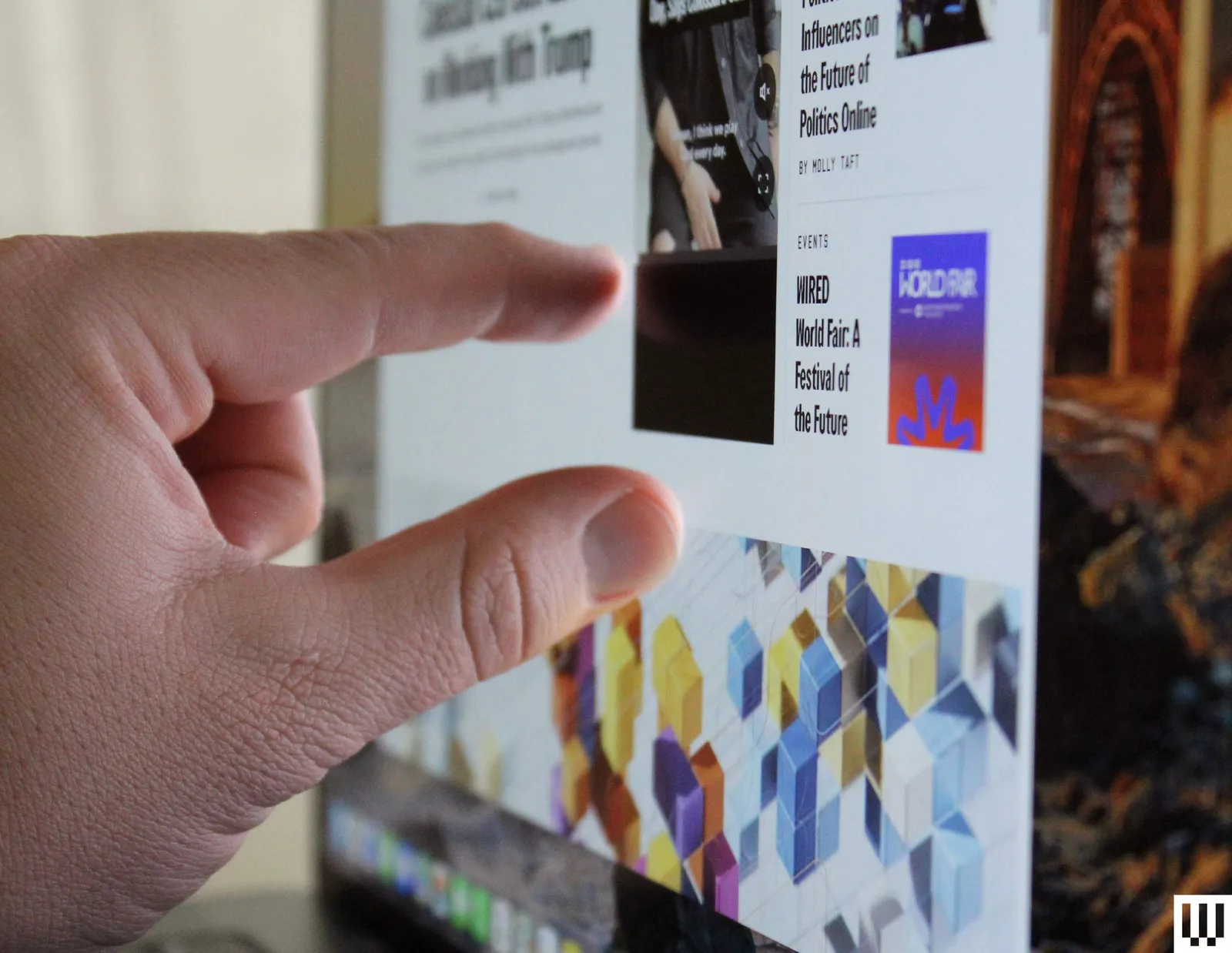
但这样的时刻少之又少。我当然不会抬起三根手指在屏幕上向上滑来切换“空间”,因为我完全可以在触控板上做到这一点,甚至不用抬手。
But those times are few and far between. I’m certainly not going to be poking three fingers up at the screen to swipe between Spaces when I could do that on a trackpad without even lifting my hand.
我在使用连接妙控键盘的iPad Air或iPad Pro时也注意到了同样的倾向。让手保持在原地更简单也更快捷。MacBook Pro的不同之处在于软件。它的界面并不怎么吸引你去触摸。现在所有可以点击的东西你都可以触摸,但用手指点按小图标和控件感觉笨拙,这一直都是如此。Windows 11里也有同样的问题。公平地说,苹果比微软付出了更多努力,调整macOS以针对触控进行优化——这与iPadOS并无不同。
I’ve noticed the same tendency when I use an iPad Air or iPad Pro connected to the Magic Keyboard. It’s just easier and faster to keep your hands where they are. The difference here on the MacBook Pro is the software. The interface doesn’t exactly draw you in to touch it. Everything that could click you can now touch, but tapping tiny icons and controls with your finger feels clumsy, as it always has. It’s the same problem in Windows 11. To be fair, Apple has put in more effort than Microsoft ever has, tweaking macOS to optimize for touch—not unlike iPadOS.
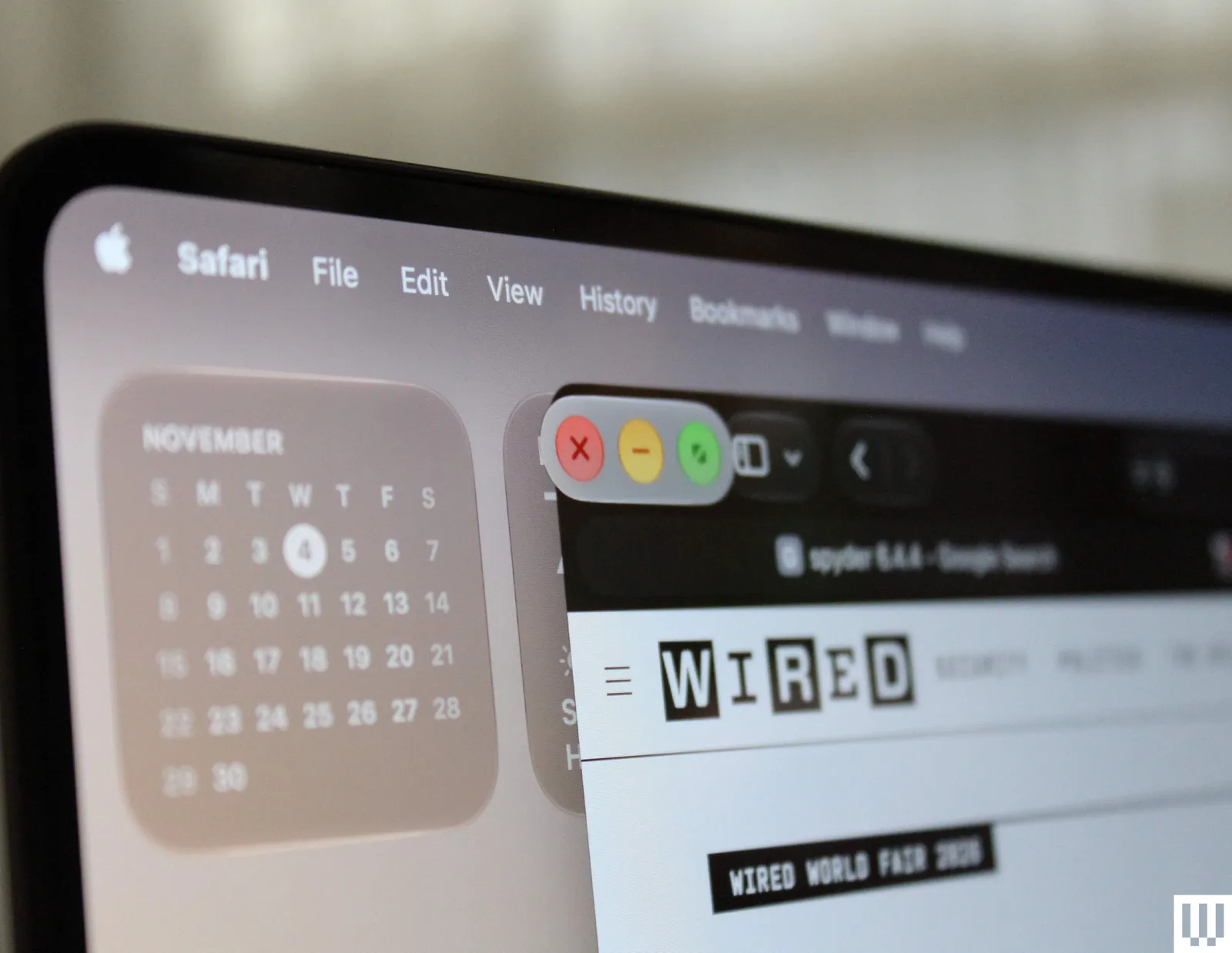
我最喜欢的优化之一发生在你点按窗口控件(用于关闭、最小化或全屏的三个按钮)时。点按之后,它会弹出,让你更精确地选择三个中的一个。菜单栏中的下拉菜单间距也更大,你可以点按并拖动手指来更轻松地选择选项。这些视觉上的触控设计很方便,而且苹果的一些应用已经找到了让某些任务基于触控完成的方法。
One of my favorite optimizations happens when you tap on the window controls (the three buttons to close, minimize, or fullscreen). After you tap, it pops out and lets you select one of the three more precisely. The drop-downs in the menu bar are also more spaced out, and you can tap and drag your finger to select options more easily. These visual touches are handy, and some of Apple’s apps have found ways to make certain tasks touch-based.
我承认,触控屏笔记本电脑对我并没有太大好处,但苹果也没有做出任何硬件改动,让触摸屏幕的感觉更自然。苹果会不会在 MacBook 上采用 180 度或 360 度铰链?我原本以为不会——不过话说回来,我从未想过 MacBook 会配备触控屏。甚至连 Apple Pencil 也不支持(更别说以那个角度使用根本不舒服了)。
I admit I don’t benefit much from a touchscreen laptop, but Apple also hasn’t made any hardware changes to make touching the screen feel more natural. Would Apple ever put a 180- or 360-degree hinge on a MacBook? I would have thought no—then again, I never thought a MacBook would have a touchscreen in the first place. Not even the Apple Pencil is supported here (not that it would ever be comfortable to use at an angle).
更大的问题是,第三方应用必须针对触控进行优化。虽然点按转触控功能开箱即用,可在所有应用中运行,但并非所有开发者都会投入精力适配。我还注意到,一些通过 Rosetta 翻译运行的应用(Rosetta 让基于 Intel 的软件能在苹果芯片上运行,例如 Steam)不支持某些功能,比如放大窗口控件。既然无法指望这些应用在触控体验上保持一致,我看不出自己会去改变使用习惯。
The bigger problem is that third-party apps have to optimize for touch. Even though click-to-touch will work in all apps right out of the box, not all developers will put in the effort. Also, I’ve noticed some apps translated through Rosetta (which lets Intel-based software run on Apple silicon, such as Steam) don’t support some features, like the zoom-in window controls. I can’t see myself adjusting my behavior when you can’t reliably expect consistency across these apps.
苹果正向创意专业人士——这类用户正是这款笔记本的目标受众——推销 OLED 版 MacBook Pro 的触控功能。这些构想略显有趣,无论是用 Pixelmator Pro 直接在屏幕上绘图,还是在 ZBrush 中为 3D 模型应用笔刷纹理。我不是艺术家,但我使用 Logic Pro。现在可以触摸屏幕直接在屏上敲击鼓点,或在 Remix FX 中绘制自动化包络。
Apple has been selling the OLED MacBook Pro’s touch capabilities to creative pros—the kind of user who would use this laptop. The ideas are mildly interesting, whether it’s drawing directly on the screen with Pixelmator Pro or applying brush textures onto 3D models in ZBrush. I’m not an artist, but I use Logic Pro. You can now touch the screen to play drums right on the screen, or draw automations into Remix FX.
但就在那时,我开始觉得这些更像是噱头,而非创意工作者真正能受益的功能。即使是业余音乐人,也总会有一台实体 MIDI 键盘;在笔记本键盘上演奏乐器(这是 Logic 由来已久的功能)比敲击屏幕更自然。我还是等着 Adobe 来打我的脸吧。
But that’s where I started to think these are more gimmicks than real features creatives will actually benefit from. Even amateur musicians will always have a physical MIDI keyboard, and playing musical instruments on the laptop keyboard (a Logic feature that’s been around forever) feels more natural than tapping the screen. I’ll wait for Adobe to prove me wrong.
事情是这样的:在我与苹果公司就触控屏进行的所有讨论中,我从未觉得触控是要取代键盘和触控板成为主要输入方式。如果目标是不太颠覆现状,这是一种稳妥而聪明的做法。这么多年来,苹果一直袖手旁观,看着微软在Windows 8这场灾难中搞砸了自己的触控实现。确实,在当今世界,你无法用手指控制MacBook屏幕,这让人感觉很奇怪。
Here’s the thing: In all my discussions with Apple about the touchscreen, I never got the impression that touch was supposed to replace the keyboard and trackpad as the primary input method. That’s a safe, smart play if the goal is to not rock the boat too much. For so many years, Apple sat back and watched Microsoft fumble its own touch implementation through the disaster that was Windows 8. It’s certainly true that in today’s world, it feels strange that you can’t control a MacBook screen with your fingers.
作为一个有孩子的人,我的MacBook倒是免遭他们指纹的侵扰。这更像是我们长期以来缺失的一项“追赶”功能,但我希望苹果能在触控上投入更多,并设计出一种更独特的整合方式。
As someone with kids, my MacBook is safe from their fingerprints. This feels more like a “catch-up” feature we’ve long been without, but I hope Apple commits more to touch and engineers a more unique way to integrate it.
同样的M5 Max 2026款OLED MacBook Pro使用与前一代相同的芯片:M5 Pro和M5 Max。这是苹果自2020年推出Apple Silicon以来首次这样做。此前,任何Mac的每个新版本都会配备更新的芯片。要么是苹果的节奏在放缓,要么是公司认为OLED触控屏足以成为吸引买家换新的强大卖点。
The Same M5 Max The 2026 OLED MacBook Pro uses the same chips as the previous generation: the M5 Pro and M5 Max. This is the first time Apple has done this since introducing Apple Silicon in 2020. Each new version of any Mac has always come with an updated chip. Either Apple’s pace is slowing down, or the company thinks the OLED touchscreen will be a strong enough draw to convince buyers to refresh.
平心而论,M5 Max和M5 Pro本就已处于顶尖水平。即便与微软Surface Laptop Ultra等搭载英伟达RTX Spark的新款笔记本电脑相比,M5 Max在整体性能上依然占据主导。看来是可以吃老本了。有传言称,苹果将完全跳过M6 Pro和M6 Max,把这些更强大的配置留到M7世代。若果真如此,那将是Apple Silicon自推出以来的又一个首次。
To be fair, the M5 Max and M5 Pro were already at the top of their game. Even compared to new Nvidia RTX Spark laptops like the Microsoft Surface Laptop Ultra, the M5 Max dominates in overall power. Time to rest on their laurels, I suppose. Rumor has it that Apple will skip the M6 Pro and M6 Max altogether, saving those more powerful configurations for the M7 generation. Again, that would be a first for Apple Silicon since its introduction.
另一方面,苹果声称,OLED版MacBook Pro的内部结构已完全重新设计,以支持PROLED XDR显示屏。目标是与非OLED版M5 Pro和M5 Max MacBook Pro实现性能持平——仅此而已。而在我的测试中,情况正是如此。在Cinebench 2026以及我测试的游戏中,得分与上一代MacBook Pro非常相似。这里我不再深入探讨——如果想了解更多性能分析,请查看我对上一代M5 Max MacBook Pro的评测。
On the other hand, Apple claims the OLED MacBook Pro internals have been completely redesigned to support the PROLED XDR display. The goal is performance parity with the non-OLED M5 Pro and M5 Max MacBook Pro—nothing more. And in my testing, that’s precisely what I saw. Scores were very similar to the previous-gen MacBook Pro in Cinebench 2026, as well as in the games I tested. I won’t go too in-depth here—check out my review of the previous M5 Max MacBook Pro if you want more performance analysis.
如果你已经拥有M5 Pro或M5 Max版MacBook Pro,那么升级到OLED版本很难说服自己,即使你能以不错的价格卖掉旧机。除非你有特定的OLED显示屏使用场景,否则我认为很多人会选择等到明年再进行性能升级。另一方面,如果你想从M1 Max或M2 Max升级,你将面临在OLED版和非OLED版MacBook Pro之间做出艰难抉择。目前,苹果仍在其产品线中销售这两款机型。
If you already own an M5 Pro or M5 Max MacBook Pro, it’s very difficult to justify upgrading to the OLED version, even if you’re able to sell it for a decent price. Unless you have a specific use case for the OLED display, I can see many people wanting to wait until next year for the performance upgrade. On the flip side, if you want to upgrade from an M1 Max or M2 Max, you face a tricky decision between the OLED and non-OLED MacBook Pro. For now, Apple is still selling both models in its lineup.
OLED版本贵400美元,仅为屏幕升级就收取如此高价,实在不菲。这还叠加了今年早些时候的涨价,那次涨价已经让M5 Max版MacBook Pro的价格额外增加了500美元。14英寸OLED版MacBook Pro起售价为2899美元,而16英寸版本起售价为3399美元——定价确实令人咋舌。
The OLED model costs $400 more, which is steep for a display upgrade. This is on top of the price increase from earlier this year, which already added an extra $500 to the M5 Max MacBook Pro. The 14-inch OLED MacBook Pro starts at $2,899, while its 16-inch sibling starts at $3,399—startling pricing to be sure.
为了进行评测,苹果寄给我一台配置升级的16英寸机型,搭载拥有18核CPU和32核GPU的M5 Max芯片,标准玻璃OLED屏(纳米纹理屏需额外加价150美元),128GB统一内存和2TB存储空间。这款配置售价7399美元,而且还不是最贵的!
For my review, Apple sent me a souped-up 16-inch model with the M5 Max with an 18-core CPU and 32-core GPU, a standard glass OLED (nano-texture is an optional $150), 128 GB of unified memory, and 2 TB of storage. This configuration costs $7,399, and it’s not even the most expensive!
内存短缺仍在持续加剧,价格短期内下降的希望渺茫。如果OLED触控屏是吸引你购买这些设备的原因,那么14英寸M5 Pro是首选。只是要知道,如果不选择M5 Max,你将放弃不少性能。
There’s little hope prices will come down anytime soon, as the memory shortage continues to tighten. If the OLED touchscreen is what draws you to these devices, the 14-inch M5 Pro is the way to go. Just know that you’re leaving a decent amount of performance on the table by not choosing the M5 Max.
卢克·拉森是《连线》的产品撰稿人和评论员,负责报道笔记本电脑、个人电脑、Mac、显示器以及更广泛的PC外设生态系统。他从事科技报道已超过十年,此前在Digital Trends担任计算领域资深编辑,在那里他花了七年时间领导该出版物的日常报道。...
Luke Larsen is a product writer and reviewer at WIRED, covering laptops, PCs, Macs, monitors, and the wider PC peripheral ecosystem. He’s been reporting on tech for over a decade, previously at Digital Trends as the senior editor in computing, where he spent seven years leading the publication’s daily coverage. ...